Problems with multiply - AD1940 on SigmaStudio
I'm using two sources, one DC with 28.0 and a sine tone, then multiplying it and using the real time display (in 28.0 format) to see the result. The negative numbers are represented as the maximum positive value.
What am I doing wrong?
Also, when adding 1 to the sine, and multiplying this signal by a small integer number (20-100), the result doesn't seem like a sine at all. I'm trying to modelate a delay for effects like Flanger, since the Controlled Delay takes only integer delays, I'd like to know how I can do it?
I'm starting with the SigmaDSP and I'm a little (very, actually) confused since I'm used to "usual" DSPs and programming with lines...
Sorry for bad english, not a default speaker.
ad1940
Audio Signal Processors
multiply
controlled
SigmaDSP Audio Processors
delay
Show More
Hello GustavoKF,
The Real-Time Display only works at very low frequency (from DC to about 10 Hz). It's limited by the speed of the USB talking back to the PC and SigmaStudio. To see audio frequency waveforms you'll need to use something else. You'll find some ways to do it here:
https://ez.analog.com/message/114296#11429
As a quick test, reduce the frequency of your sine wave to 2 Hz, and see how the Real-Time Display looks then.
Likely there's nothing wrong with the way you're using the DC source and multiplier. You'll know for sure once you set up a better viewing method.
Best regards,
Bob
Hello GustavoKF,
You can also check the number formats of SigmaDSP using the DSP Readback cell.
Unfortunately, the data capture registers on the AD1940 have limited range. They won't be able to capture very small signals because they lack the lower bits required to do this.
More information is available here: https://ez.analog.com/docs/DOC-3168
I'm using a LFO with 0.2-2 Hz, so it should be no problem at all... The main problem is the value that the signal is getting. It is showed in the real-time display as 0x7FFFFFF (maximum positive value), instead of 0xFFFFFF0 (-16, as example).
Debugging becomes harder this way. Also, the values are small (from 0 to 80), it becomes too noisy when I put it as output in the DA.
Hello GustavoKF,
Sorry I didn't understand your application -- I thought you were looking at audio tones, not the low-frequency modulation of your flanger. With the latter, there's no trouble with the frequency, but as Brett noted, the -1940 truncates the lowest 4 bits of the readback -- thus a resolution problem.
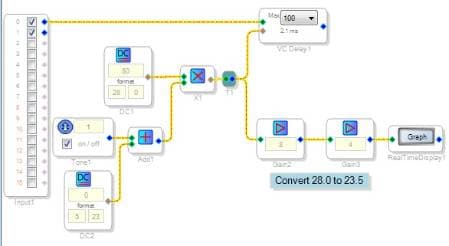
With hardware handy I tried the multiplication and initially got the same strange result you described. After some experimenting, I concluded that the Real-Time Display doesn't work with settings of 24.4 or smaller -- likely because the -1940 doesn't provide the full number of bits down there. Apparently the sign bit is also lost, causing the polarity flip we both see. To work around this I multiplied the display's input by 32, effectively shifting 5 bits to the left -- thus converting 28.0 to 23.5 format, which the -1940 can faithfully read back:
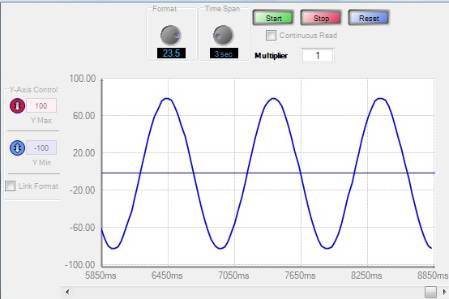
The Real-Time Display works fine at the 23.5 setting, as shown below:
.
Hope that helps,
Bob

Thanks Bob,
Nice fix!
I agree that the problem with the real time display is probably the lack of the lower bits from the readback.
Please log in to reply.