Real Time Display on SigmaStudio 3.8 crashes
Everytime I place the "real time display" , and click on it to see the signal , it hangs up after a couple of seconds and downloading isnt possible anymore to the EvalBoard 1701 and I have to reset the boeard and restart SigmaStudio to establish the USB connection again.
Any Idea ?
display
sigmastudio
realtime
Hi,
I used to have this trouble with the RT Display on an older PC, but not on a Core i3 laptop. So it appears that crashes occur when SigmaStudio can't keep up with the stream of data coming over the USB. When this happens, as you noted, the only fix is to unplug (reset) the USBi and restart SigmaStudio. Another possibility is the USB port in use -- the USBi is not compatible with USB 1.0, and I've had trouble with USB 3.0, so I stick with USB 2.0. Also, since the eval board is USB powered, a long, thin cable could drop too much voltage. I use a short, stout cable that came with an old backup drive.
Thus check your cable. If you're running a slow PC, try testing the RT Display with another one. If on the other hand your machine is quite new, try a different USB port (my laptop has two 3.0 ports and one 2.0).
Best regards,
Bob
Hi Miguel, Hi Bob :-)
thanks for your fast replies.
I must blame myself - I modified the cable between USBi and EVAL with a Cap that decoupled the ground.
It works most of the times, reason for it was some noise on my headphones during monitoring the board, and with the cap between it was gone.
But it was the reason that the connection wasnt stable enough I guess..... :-)
So I removed the cap and its working now, - but still got the noise again ..
Hi Stephan:
Nice to hear that you are playing around with the Sigma. I have experienced some of this communication problems in the past. It's difficult to blame the cables BUT most of my problems have been fixed by using a different or shorter USB cables.
Please let us know if this makes a difference.
Regards
Miguel
Hi,
The added cap is a creative way to eliminate the ground-loop between your PC & your input source! Since unfortunately the cap introduces the USB communications difficulty, here's a few possible ways to kill the ground-loop noise:
If you're using a laptop, run it on battery for critical listening tests -- that works for me.
Apply an audio coupling transformer to each input.
Build the isolated USB interface described at http://www.analog.com/static/imported-files/newsletters/digital_isolation/USB_cable_Nappnote_Rev_d.pdf -- There's also ready-made isolators available.
Bob
Thank you Bob.
Your advice with the isolated USB Interface is interesting.
I'm currently searching for optically isolated USB Hubs.
I have bought an USB-Isolator with following specifications, and its working fine with USB sticks, but with the
USBi control interface from AD it won't work.
Does anybody has a clue why its not working ?
Download not possible, and PC does not recognize the device ( automatic no driver install )when connecting via USB-Isolator..
USB OPERATING MODES
FULL SPEED (12 MBIT/S)
LOW SPEED (1,5 MBIT/S)
ISOLATION
1 KV DC
OPERATING
TEMPERATURE
-40°C TO +70°C
DIMENSIONS
APPROX. 57 X 45 X 28 MM
FEATURES
USB 2.0 COMPATIBLE
NO DRIVERS REQUIRED
POWER-ON LED
http://www.cesys.com/uploads/tx_cncesys/USB_ISOLATOR_USERS_MANUAL_.pdf
I'm not sure why this might be causing a problem.
I use my USBi with a USB 2.0 hub all the time and it works fine.
The USBi hardware design follows the Cypress USB interface reference design very closely, so I'm not sure if this problem is specific to the USBi if if it's simply something the Cypress IC doesn't support.
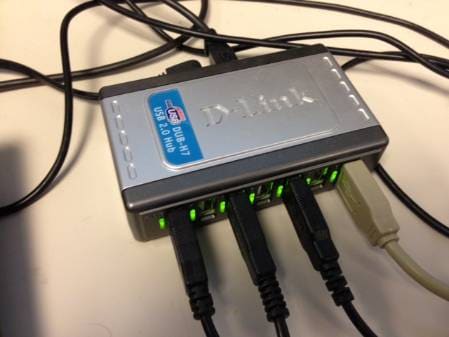
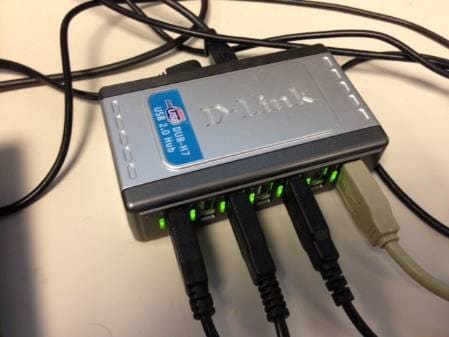
Hi Brett,
is this Hub an isolated one ? ( because of my noise problems )
No, my hub is not isolated. Unfortunately I don't have access to an isolated hub, so I'm not sure if I can test this.
This question has been assumed as answered either offline via email or with a multi-part answer. This question has now been closed out. If you have an inquiry related to this topic please post a new question in the applicable product forum.
Thank you,
EZ Admin
Please log in to reply.