no communication from host pc and 21489 board on sigma studio
Hi I just received the ADSP-21489 EZKITLITE and am starting to work on it. When I connect the USBi block to the ADSP-214xx block in hardware configuration, the USB color is always red and it should be orange from what I read.
What I have done:
1. selected loader file ss_app_sh489.ldr and booted target, USB still stays red
2. I could link project, link compile connect (get message "Ready:Compiled"), but when I do link compile download I get "Compiled, Comms Failed".
3. I have checked my device manager and the board is listed with drivers up to date.
4. all switches are configured to the run prebuilt sigmastudio applications in the USER GUIDE.
>>> the USB block is always red. Please help
Also, if the project is successfully downloaded to the board via sigma studio, will the program be running on the board? -or is it sent to CCES?
I have found little docomentation relating sigmastudio and CCES. Can you explain or help me find documentation for work flow between sigmastudio and CCES?
Thanks
cces
Audio Signal Processors
sigma_studio
adsp-21489
comms_failed
SHARC Audio Processors/SoCs
Show More
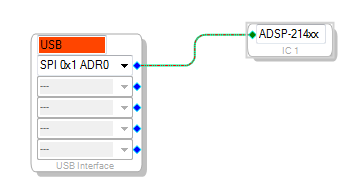
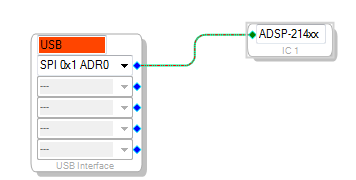


Hello,
Once the USBi is connected to the PC, the color on the block is expected to be orange. Kindly remove the USBi, close the SigmaStudio and retry. You could also try connecting USBi using a different USB cable and also on a different USB port on the PC. Please let us know the observations.
Once the LDR is booted and schematic is downloaded, the program will run on the board. Additional steps are not required. CCES is required to be launched only to customize the default LDR file. Refer to "SigmaStudio for SHARC Reference Guide" for more details on customizing the default application.
Best Regards,
John
Correction: Boot target does not boot target. Gives comms fail message at bottom. what is wrong??
Hi
I removed the USBi, restarted sigmastudio, opened a test project, and reconnected the USBi. Nothing changes in the hardware configuration window. The color on the USBi block stays red. I have also switched the USBi cable and used different ports. My PC device manager recognizes the board but SigmaStudio does not.
I am on Sigma studio 3.8
Hello.
What is the operating system installed on the machine and which version of the USB port are you using? One thing to make sure of is that you're connecting the USBi to a USB 2.0 port.
Again, when you connect the USBi to the PC, do any of the USBi's LEDs light up?
Best Regards,
John
I am using windows 7 64 bit.
I am using a USB port that supports both 2.0 and 3.0
when I connect the USBi to the PC, the power LED is green and the status LED is orange.
Hello,
This looks like just some sort of driver issue. Have you tried the same after restarting the machine? If not, please try restarting the machine.
Regards,
John
I have tried restarting the machine. I even switched computers and have the same issue.
This is what I did when switching to a new machine:
1. install sigma studio 3.8 64bit
2. install CCES 1.0.1
3. instal ADI_ADSP-21489_EZKIT-Rel1.0.0
4. install sigmastudio_for_sharc sh rel2.0.0_prod
5. Open CCES, register
6. Open SS, put 21489 processor block and USBi block into hardware configuration tab
7. connect board (driver installs successfully and shows up in Device Manager on Windows 7 64 bit)
8. get communication failure (restart programs, get same communication failure)
Is there a configuration I am missing?
Hello, Issue seems to be related to USBi PC host driver. For more specific expert advice on this topic, this post is being re-directed to the SigmaStudio group which is part of https://ez.analog.com/community/dsp/sigmadsp. Thank you very much for your patience.
Regards,
Processor Tools Support Team.
Hello,
I believe your issue has been resolved through private email support. Let us know if you have any further problems.
Regards,
Linda
This question has been assumed as answered either offline via email or with a multi-part answer. This question has now been closed out. If you have an inquiry related to this topic please post a new question in the applicable product forum.
Thank you,
EZ Admin
Please log in to reply.