SigmaStudio creation of selfboot image hex file
We are testing a prototype of a stand alone i2c programming dongle for our ADAU1701 project. The dongle takes the selfboot hex file created from SigmaStudio and stores several of them internally. A press of the button will flash the selected image into the ADAU1701 eeprom. The dongle resets the DSP and disables itself on the bus so the DSP can properly self boot. This all works, the issue (minor) which we are having is that the Sigma Studio software won't generate the IC2 folder or the E2Prom.hex file unless the USBi dongle is attached. (Doesn't have to be attached to a DSP, just needs to be attached to the computer.) The file is only written when "Write Latest Compilation to EEProm" is selected, that object is greyed out unless a programmer is involved. Is there any way of getting Sigma Studio to create this file without the USBi dongle?
I just tried a few more things, which got me back to where I was on Friday. The option does appear on the software after a Link/Compile, but using it causes a fatal crash to Sigma Studio if the USBi is not attached.
See image:
Richard
Nikola Engineering
Audio Signal Processors
image
adau1401
i2c
sigmastudio
SigmaDSP Audio Processors
selfboot
adau1701
hex
Show More
Hi Richard,
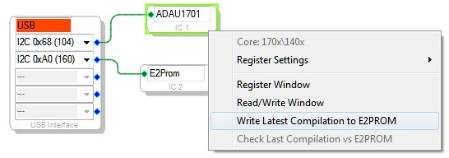
I was able to get this to work without having hardware attached. See the following screenshot:
Steps:
Create a project
Add a USBi to the hardware window (even if you don't have the hardware physically connected to the computer)
Add an ADAU1701 and E2PROM to the hardware window and connect them to the USBi
Create the signal flow in the schematic tab
Save the project somewhere on your hard drive
Link-compile-download (you will get an error saying that communications failed, but you can ignore that)
Right-click the ADAU1701 and select "Write Latest Compilation to E2PROM"
This worked for me. An E2Prom.Hex file was generated in the IC2 folder that was created in the directory where I stored the project.
Please follow these steps exactly and see if you can get it to work.
Thanks!
Brett

Thank you Brett:
Yes, this does work to use the Link/Compile/Download. The Link/Compile/Connect generates the crash above. (Retry closes, the window, but does not create the folder or file, Abort closes Sigma Studio)
Richard
Nikola Engineering
Interesting. I think maybe the Link-Compile-Connect function tries to read back from the hardware to make sure the connection is set up properly, and perhaps the exception isn't being properly handled when the hardware is unexpectedly absent. I will let the software team know about this problem!
Please log in to reply.