Help getting ADC in ADAU1701 to have proper sampling rate.
Hi,
My senior design project is having trouble with our ADAU1701 Eval board. According to the specs, the ADCs should be able to run at 48kHz and beyond, however we are seeing very poor square wave performance at less than 10kHz. This leads us to believe that our board is not set up properly in terms of sample rate or perhaps there is a filter we are not seeing. We are by no means experts on the DSP, but we have not been able to find an answer to this issue by searching the forums.
In short, what settings would we need right out of the box to guarantee the highest sample rate for the ADC? We have not changed very many things in SigmaStudio.
Thanks,
Saul
Audio Signal Processors
square_wave
sigmastudio
SigmaDSP Audio Processors
sampling_rate
frequency
adau1701
Show More
Hi slipton,
A few questions for you:
- Which evaluation board are you using? The EVAL-ADAU1701MINIZ, or the EVAL-ADAU1401EBZ?
- What is the sample rate of the project?
- If the sample rate is not 48 kHz, have you set the sample rate following this step-by-step guide? https://ez.analog.com/docs/DOC-1431
- What is the source of the square wave? Are you using an external signal generator, or are you using a square wave in SigmaStudio?
Note that the frequency spectrum of a square wave contains components of the odd harmonics. This means that for a 1 kHz square wave, there will be significant frequency components at 3 kHz, 5 kHz, 7 kHz, 9 kHz, et cetera. If those frequency components are missing, the resulting waveform will not look very much like a square wave. Now, imagine your example with a 10 kHz square wave. You'll need to include the harmonics out to about 90 kHz in order to get a decent-looking result, which means the sample rate of the system should be maxed out at 192 kHz.
Here's a great little graphic from Wikipedia showing how removing the higher harmonics of a square wave makes it look more like a sine wave: http://en.wikipedia.org/wiki/File:Square_wave_frequency_spectrum_animation.gif
Hi, thanks for the reply. Your reminder about the harmonics of the square wave made me realize that most likely I am operating the EVAL-ADAU1701MINIZ at 48kHz, and just thought the square wave looked poor without double-checking what it should look like. I would love to operate the DSP at 192kHz, but that seems to not be working. Can the ADCs operate at 192kHz as well as the DACs? Thanks.
Saul
Hi,
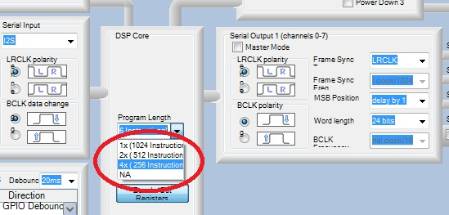
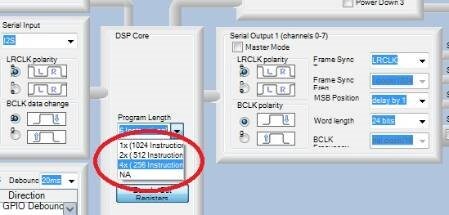
When the DSP is operating at 192KHz, the ADCs and DACs go along for the ride. In case you nay have missed the full import of Brett's post above -- to run your project at 192Khz, you must go into SigmaStudio's Hardware Configuration window, Register Control tab and select 4x (256 instructions) under Program Length in the DSP Core Register, as shown below:
This is what really sets the DSP to 192KHz. The drop-down Sample Rate box atop SigmaStudio's schematic window only configures time-sensitive blocks (such as filters) for a particular sample rate.
Bob
Hi,
Thanks for the clarification. I have done that and noticed some improvement, so I should probably call that as good as it gets. Thanks,
Saul
This question has been assumed as answered either offline via email or with a multi-part answer. This question has now been closed out. If you have an inquiry related to this topic please post a new question in the applicable product forum.
Thank you,
EZ Admin
Please log in to reply.