USBi random disconnections?
Hi All, first post here and unfortunately it's to report a fault.
I have just received the EVAL-ADAU1761Z and it's all very lovely.
Some times the SigmaStudio will loose contact with the USBi device. The ADAU1761 chip continues to function however I am unable to control it or reprogram the device without unplugging the USB cable (power cycle) - reinserting and waiting for about 10 seconds.
I run Windows 7 ( all the latest updates ) on a 2 year old Macbook Pro
I have attached a number of images below.
I've searched the forum and found at least one other post related to this... do I need a new USBi or eval board?
Thanks
Audio Signal Processors
SigmaDSP Audio Processors
adau1761
Hmm, that is unfortunate. We have not, to my knowledge, tested SigmaStudio running on a Windows installation on Mac hardware. In theory, it should all work fine, but I wonder if there's some driver issue that is causing a timeout or some other sort of intermittent failure.
How often does this problem occur?
Is it reproducible by following a certain set of steps?
What are the states of the LEDs when the failure occurs?
I am seeing very similar problems, but using native windows 7 on a PC.
This exact same setup has programmed successfully many times in the past, but is now extremely unreliable. It's very frustrating when the majority of the development time is getting the tools to work, rather than finishing our products.
When starting SigmaDSP (3.5.7), and doing a link/compile/download, it reports a USB communications error, and there is no activity on I2C. Subsequent repeat L/C/D do not show an error, but the programmer does nothing.
Similarly, when trying to program our EEPROM we just have the system waiting, with no I2C activity and no green bar progress.
Have the USBi boards been updated recently? Perhaps we need new ones.
With a series of reboots, reconnecting USB, and resetting the chip, it seems to be programming again; perhaps this will work for you as well. I do wish it was a more reliable system.
A field applications engineer recently contacted me and reported similar issues. He said that he unknowingly installed multiple versions of SigmaStudio and was concerned that maybe there was some kind of driver contention issue going on. Have you uninstalled previous SigmaStudio installations before your most recent installation?
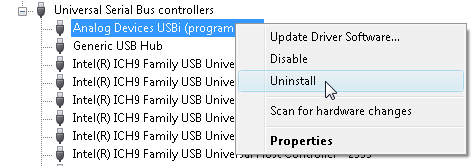
I have a second thought - did you try uninstalling the USBi drivers and then reinstalling them after a reboot?
To uninstall the drivers, follow these steps:
- Connect the USBi.
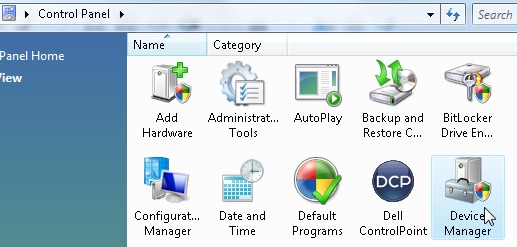
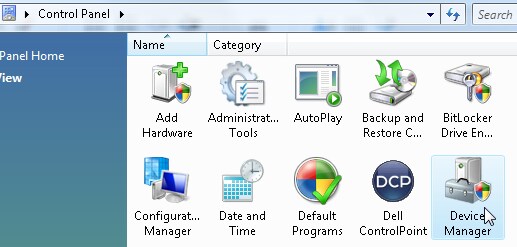
- Go to the Device Manager. There are a number of ways to get there, including via Control Panel.
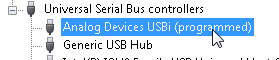
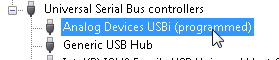
- Find the USBi in the list of USB devices.
- Right-click and choose the uninstall option.
- After the uninstallation is complete, disconnect the USBi and restart your computer.
- After your computer has restarted, reconnect the USBi.
- If you are prompted to manually find the drivers for the USBi, point to the SigmaStudio/USB Drivers directory on your hard drive.

I am the applications guy referenced above.
I installed a new version of sigma studio and I guess I expected it to overwrite the existing version. This caused a communication error that must have been due to drivers clashing.
Uninstalling both and reinstalling fixed everything up
This question has been assumed as answered either offline via email or with a multi-part answer. This question has now been closed out. If you have an inquiry related to this topic please post a new question in the applicable product forum.
Thank you,
EZ Admin
Please log in to reply.