Distortion with ASRC input on ADAU1445
I am experiencing noticeable distortion when using an synchronous input on the 1445. I used a logic analyzer to capture the samples going to the 1445 and verified that they are pure (I'm using a canned 1kHz digital tone in the processor feeding the asynchronous samples). The 1445 is running at 48kHz and the samples are arriving at 44.1kHz
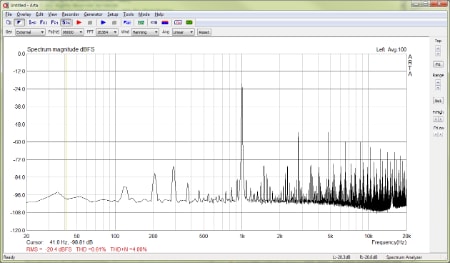
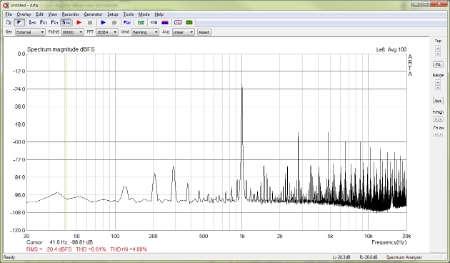
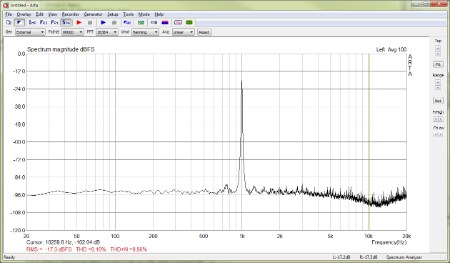
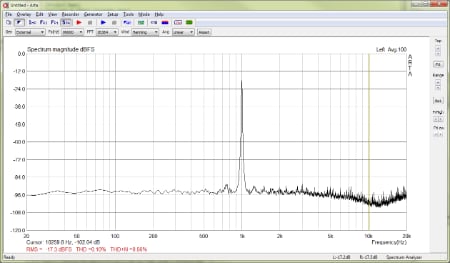
Below is a capture of the signal from the 1445 (through a DAC) when using the asynchronous tone. Note the strong spurs ~36dB below the fundamental:
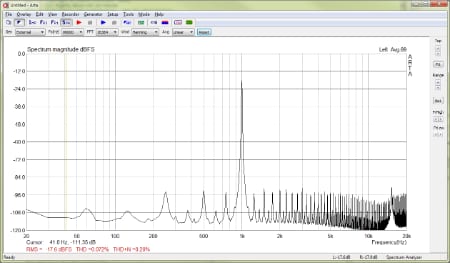
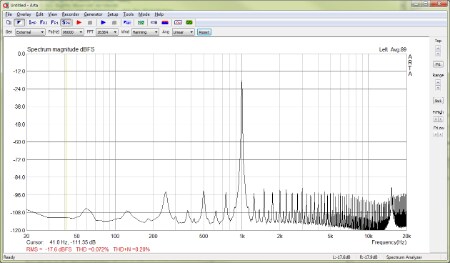
This is a capture when generating the tone within the DSP itself. Noise is ~72dB below the tone.
Any thoughts as to the cause of this? Thanks,
-- Ryan
Audio Signal Processors
adau144x
adau1445
sigmastudio
SigmaDSP Audio Processors
asrc
Show More
You will definitely get some distortion if the ASRCs are not correctly configured to resample and synchronize the asynchronous input. Perhaps it's a problem with the ASRC settings.
Would you mind sharing a screenshot of the "Routing Matrix" section of the hardware configuration window so I can see how you've configured and routed the ASRCs?
If you were using SDATA_IN0 to input the sine tone, for example, then the settings would look like this:
You would then need to connect the ASRC Input cell's first two channels to the DSP output channels 0 and 1:
Is the DAC operating as a slave to the SigmaDSP? Are you using the CLKOUT pin on the SigmaDSP to feed the master clock input on the DAC? Also, do you know if the DAC has de-jitter circuits that re-time the incoming data to avoid glitches?
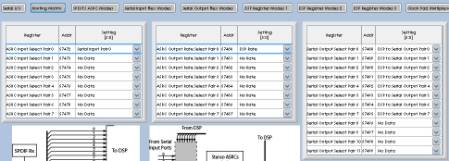
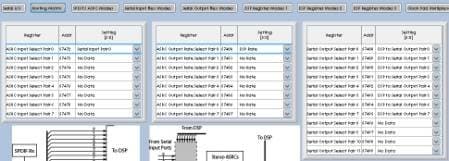
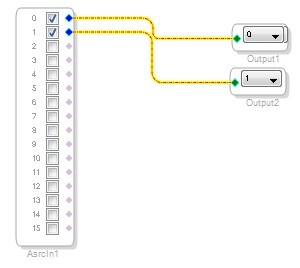
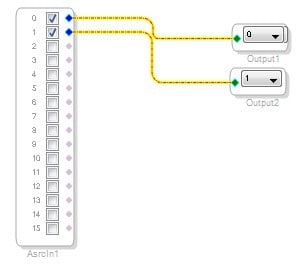
Thanks Brett. Here's a view of my ASRC config. I'd sent you a PM awhile back describing our setup more which may provide some useful information.
As for the DAC, it's actually a little more complicated than just a DAC, but the 1445 is the master for all the 'downstream' conversion, so I don't think it's anything on the back-end.
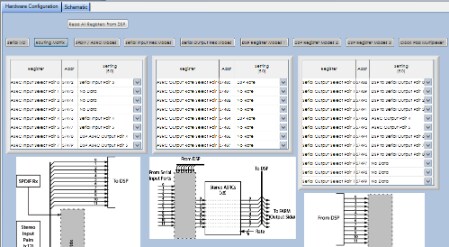
Brett, here is a pdf of our DSP schematic. Let me know if anything is unclear or you need more context.
https://dl.dropbox.com/u/427616/DSP.pdf
Thanks,
-- Ryan
Thanks, Ryan. One last request. Could you label (or list) which serial ports are masters and which are slaves?
For example:
SDATA_IN0 master
SDATA_OUT0 slave
...
and so on.
Thanks!
Brett
Sure!
SDATA_IN0: MASTER, stereo @ 48kHz
SDATA_IN1: MASTER, stereo @ 48kHz
SDATA_IN2: MASTER, stereo @ 48kHz
SDATA_IN3: SLAVE, stereo CLOCKED EXTERNALLY (~44.1kHz)
SDATA_IN4: SLAVE, packed TDM4 CLOCKED EXTERNALLY (~8kHz)
SDATA_IN5: N/C
SDATA_IN6: MASTER, stereo @ 48kHz
SDATA_IN7: MASTER, stereo @ 48kHz
SDATA_IN8: MASTER, stereo @ 48kHz
SDATA_OUT0: MASTER, stereo @ 48kHz
SDATA_OUT1: MASTER, stereo @ 48kHz
SDATA_OUT2: MASTER, stereo @ 48kHz
SDATA_OUT3: N/C
SDATA_OUT4: SLAVE, packed TDM4 CLOCKED EXTERNALLY (~8kHz)
SDATA_OUT5: N/C
SDATA_OUT6: MASTER, stereo @ 48kHz
SDATA_OUT7: MASTER, stereo @ 48kHz
SDATA_OUT8: MASTER, stereo @ 48kHz
So one concern I have is that we're using the 1445, which supports two 8-channel ASRCs, and I'm not sure if our setup is using 2 or 3. Both SDATA_IN4 and SDATA_OUT4 are slaved from the same external device, and so are really the same rate, but I'm not sure if the 1445 still treats those as two separate ASRCs.
-- Ryan
Part of the problem with making the ADAU144x family so flexible is that it becomes a bit difficult to figure out the routing in complex systems.
OK, so, first I would go through and basically set up the serial ports. Based on what I know about your system, it should look something like this:
You might need to tweak some of the settings to match your actual signal properties. I concerned myself with the clock output enable, master/slave, and channel count settings.
I also know from discussions with you that you're going to use clock domain 4 on the input side and clock domain 5 on the output side, so you need to set the clock pad multiplexer to match:
Next, I would figure out the automatic channel assignment in the routing matrix. You can find more details about this in the datasheet when you search for Automatic Channel Assignment.
SDATA_IN0: MASTER, stereo @ 48kHz - Channels 0,1
SDATA_IN1: MASTER, stereo @ 48kHz - Channels 2,3
SDATA_IN2: MASTER, stereo @ 48kHz - Channels 4,5
SDATA_IN3: SLAVE, stereo CLOCKED EXTERNALLY (~44.1kHz) - Channels 6,7
SDATA_IN4: SLAVE, packed TDM4 CLOCKED EXTERNALLY (~8kHz) - Channels 8,9,10,11
SDATA_IN5: N/C - Channels 12,13
SDATA_IN6: MASTER, stereo @ 48kHz - Channels 14,15
SDATA_IN7: MASTER, stereo @ 48kHz - Channels 16,17
SDATA_IN8: MASTER, stereo @ 48kHz - Channels 18,19
SDATA_OUT0: MASTER, stereo @ 48kHz - Channels 0,1
SDATA_OUT1: MASTER, stereo @ 48kHz - Channels 2,3
SDATA_OUT2: MASTER, stereo @ 48kHz - Channels 4,5
SDATA_OUT3: N/C - Channels 6,7
SDATA_OUT4: SLAVE, packed TDM4 CLOCKED EXTERNALLY (~8kHz) - Channels 8,9,10,11
SDATA_OUT5: N/C - Channels 12,13
SDATA_OUT6: MASTER, stereo @ 48kHz - Channels 14,15
SDATA_OUT7: MASTER, stereo @ 48kHz - Channels 16,17
SDATA_OUT8: MASTER, stereo @ 48kHz - Channels 18,19
That's a total of 18 valid input channels and 16 valid output channels. You still have to count the unused channels because the automatic channel assignment hardware isn't intelligent enough to know that those pins aren't being used. So, that's a total of 20 input channels and 20 output channels.
Now, I'll figure out the ASRC routing. The way that the ASRCs on the ADAU1445 work is as follows:
ASRC0 (i.e. ASRC channels 0,1) take their target sample rate from the ASRC Output Rate Select Pair 0 register.
ASRC1 (i.e. ASRC channels 2,3) take their target sample rate from the ASRC Output Rate Select Pair 0 register.
ASRC2 (i.e. ASRC channels 4,5) take their target sample rate from the ASRC Output Rate Select Pair 0 register.
ASRC3 (i.e. ASRC channels 6,7) take their target sample rate from the ASRC Output Rate Select Pair 0 register.
ASRC4 (i.e. ASRC channels 8,9) take their target sample rate from the ASRC Output Rate Select Pair 4 register.
ASRC5 (i.e. ASRC channels 10,11) take their target sample rate from the ASRC Output Rate Select Pair 4 register.
ASRC6 (i.e. ASRC channels 12,13) take their target sample rate from the ASRC Output Rate Select Pair 4 register.
ASRC7 (i.e. ASRC channels 14,15) take their target sample rate from the ASRC Output Rate Select Pair 4 register.
In other words, you can only have 2 target sample rates, as set by the ASRC Output Rate Select Pair 0 register and the ASRC Output Rate Select Pair 4 register. The other 6 ASRC Output Rate Select Pair x registers are ignored.
You have a total of 6 asynchronous inputs and 4 aynchronous outputs, so in that sense, you're good in terms of channel count. All of the asynchronous inputs have the DSP rate as their target rate, and all of the asynchronous outputs will take their target rate from channels 8,9,10,11 on the output serial ports. So, everything looks OK for the ASRCs.
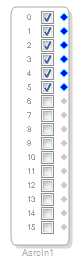
Let's say for now that the aynchronous inputs will use ASRC channels 0 through 5, and the asynchronous outputs will use ASRC channels 8 through 11.
Now, for the routing matrix, I'll start on the back end (output side) by setting the Serial Output Select Pair registers. You have 20 output channels, so you'll need to configure Serial Output Select Pair 0 through Serial Output Select Pair 9. You can do a basic 1-to-1 setting for most of those to match their DSP to Serial Output Pairs, except for channels 8,9,10,11, which will come from the ASRCs.
Next, I'll set the ASRC target sample rates. This is pretty easy. We want the first 4 stereo pairs to target the DSP rate, and we want the last 4 stereo pairs to match the clocks for output channels 8,9,10,11 (i.e. serial output pairs 4 and 5, either-or).
You only really need to input the settings for Pair 0 and Pair 4, but I filled them all in just to remind myself that this is an ADAU1445 we're working with.
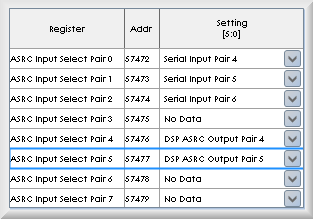
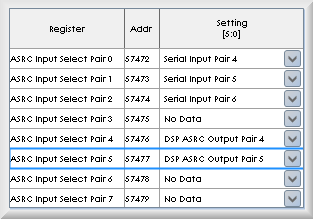
OK, now we need to tell the ASRCs where the source of their data is coming from. This is pretty arbitrary, but I'm going to do it like this:
SDATA_IN3: SLAVE goes to ASRC Input Pair 0. These are serial input channels 6 and 7 (i.e. serial input pair 4).
SDATA_IN4: SLAVE goes to ASRC Input Pairs 1 and 2. These are serial input channels 8, 9, 10, and 11 (i.e. serial input pairs 5 and 6).
We also want ASRC channel pairs 4 and 5 to get their data from the DSP and then output it asynchronously. So, those will come from the DSP itself. The channel assignment here is arbitrary, but I'll keep the same channel numbers for sanity's sake. In the end, it looks like this:
Now, finally, I need to route the data in the DSP.
Input Channels 0, 1, 2, 3, 4, 5, 14, 15, 16, 17, 18, and 19 will come directly from the serial ports.
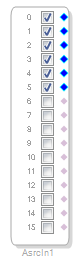
The data on SDATA_IN3 and SDATA_IN4 will be routed through the ASRCs, so we need an ASRC input as well to cover that. The 6 channels of data will be on ASRC channels 0 through 5.
Now, on the output side.
Output Channels 0, 1, 2, 3, 4, 5, 14, 15, 16, 17, 18, and 19 will come straight from the DSP.
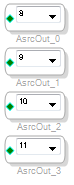
We also need to route data from the DSP to the ASRCs (for the asynchronous outputs). I chose pairs 4 and 5 (channels 8, 9, 10, and 11):
With that, I think all of the inputs, outputs, routing, and DSP I/O have been set up.
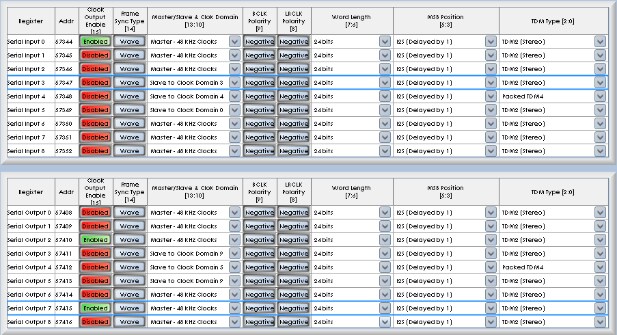


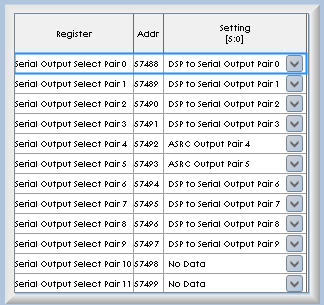
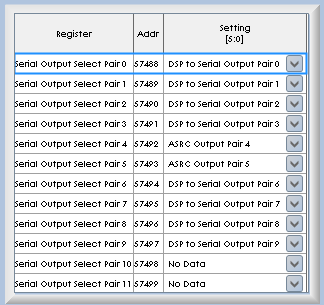
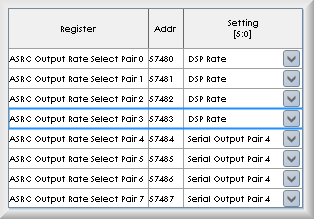
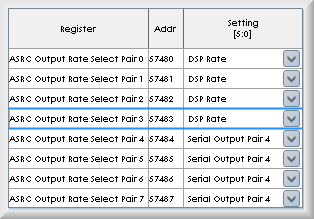





Here's my project for reference.
Brett, thanks so much for helping with this. After modifying my board and incorporating your settings, the audio quality is drastically better. I did have some errors in my ASRC register settings before, but I think the my biggest mistake was not realizing that I needed different input and output ports for the ASRC channels in the schematic -- I'd just been using the standard I/O ones.
One minor issue in your walkthrough -- for the ASRC input select pairs 0-2, you set them to 'Serial Input Pair' 4-6. That should be 'Serial Input Pair' 3-5.
Thanks again for taking the time to go through this and explaining it so clearly!
-- Ryan
Please log in to reply.