Bug in Peak and RMS Compressor?!
Hello,
in my recent project I would like to use those Peak- and RMS- compressors with its nice user interface. Unfortunately these two blocks seem to have bugs. Or I am missing something.
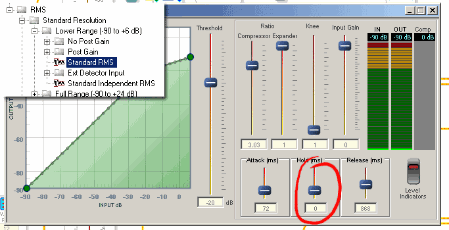
1. Standard RMS Compressor:
When first opened "Hold"-time is "0" although the slider is not set to "0". As soon as I try to adjust "Attack" or "Hold" Hold-time jumps to the value that is shown as Attack-time. From now on it is not possible to set Hold-time lower than Attack-time. Can you reproduce this? I can not imagine that this is as it is intended to.
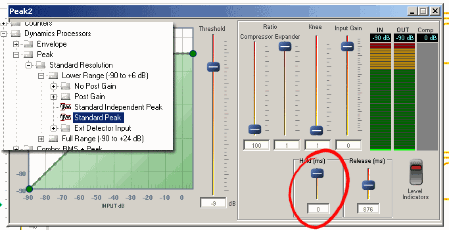
2. Standard Peak Compressor
When first opened "Hold"-time shows "0" although the slider is at maximum. When touching this slider time jumps to "500" and is not changeable anymore!?!?
Another issue here is when switching on the Level Indicators IN and OUT show very unsteady values (bargraph is jumping) even if a pure sinwave is fed. (by the way: Standard RMS Display is stable).
I'd like to use this block as peak-limiter. So ratio is set to "100". Threshold adjustment is difficult because the shown dB value does not match real live Theshold. Example: feeding -9dBFS to that block I have to adjust Threshold to about -12dB until limiting occurs.
Please can someone take a look at these issues und tell me if I am wrong or if these problems occur in your version, too. And especialy how I can solve these problems! :-)
I am using SigmaStudio 3.5.7 on Win XP Pro
Cheers
Bernd
rms
Audio Signal Processors
compressor
adau1442
bug
sigmastudio
peak
SigmaDSP Audio Processors
standard
Show More

Hi,
is there nobody having a idea regarding this issue?
Regards
Bernd
I somehow skipped v3.5 and jumped straight to v3.5.7 Beta.
This interface is replaced by the old interface. I guess this could be to fix this issue.
Nice interface though.
kksl
Hi Bernd,
I was able to confirm these issues with the peak compressor and report them to the software team. They are looking into the issues with the GUI. The issues have been entered into our internal bug tracker.
Question has been marked as "assumed answered" because the issue has been confirmed and reported to the software team.
This question has been assumed as answered either offline via email or with a multi-part answer. This question has now been closed out. If you have an inquiry related to this topic please post a new question in the applicable product forum.
Thank you,
EZ Admin
Please log in to reply.