Reaching Processor Cycles limit on ADAU1761
Hi everybody,
is there an indication from the compiler when the number of processor cycles is completely used?
Often I create applications with a lot of filters and other blocks that compile correctly and don't utilize all of the resources,
but when the application is run I get a sort of background whistle at high frequency.
I suspect that the needed processor cycles are more than those available because if I remove, for instance, a filter block
the whistle disappears (after recompiling and uploading), and if I add the block again it comes back.
From what I see there is no error message from SigmaStudio about reaching the processor cycle limit ... Is it possible to know how many cycles per sample are left ? Am I right or is there a different explanation?
Audio Signal Processors
SigmaDSP Audio Processors
adau1761
Hello,
I was pulled into several high-priority, time-critical projects at work over the past few weeks and unfortunately I had to de-prioritize my participation in the forum as a result. So, I apologize for making you wait so long for an answer. I am going to try to respond to everybody's questions within the next few days.
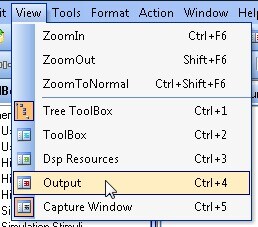
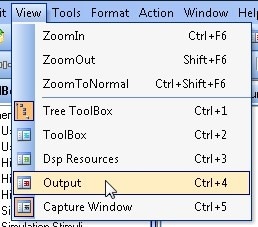
Try activating the Output Window in SigmaStudio. It will show the compiler output for Generation 2 cores and later. You can find this window under the View menu:
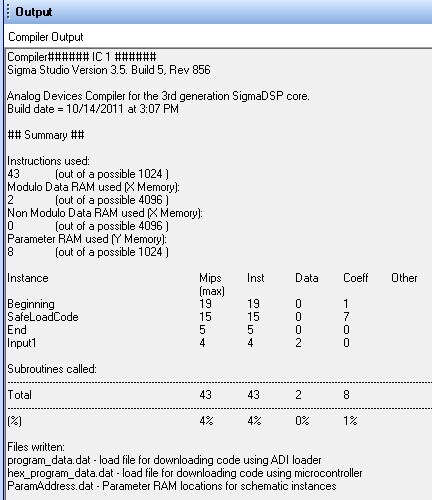
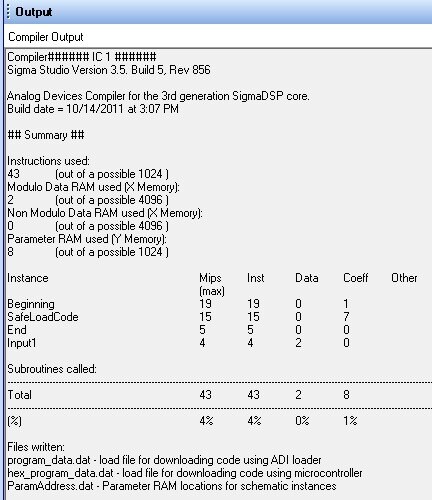
When you compile the project, you will see the used memory vs. available memory, as seen here:
The important number here is MIPS. Actually, this is an inaccurate label. It should be labeled IPS (instructions per sample). MIPS generally refers to Million Instructions Per Second, which would be IPS times the sample rate, divided by one million. For 48 kHz, the maximum number of MIPS is calculated like this:
1024 instructions per sample * 48000 samples per second / 1,000,000 = 49.152 MIPS.
The left-most column in the output window actually shows instructions per sample, and the maximum is 1024.
If any of these columns gets up to 99% or 100% or so, you might end up with an audible audio glitch because the DSP is running at full capacity. Can you check the stats for your project that is experiencing errors?
Thank you so much for the reply.
I actually performed a check on my designs, and the IPS indicator is only at 60% or so. No other percentage indicator goes over 82% ....
I will perform further tests, probably my problem is not related to exhaustion of available cycles ...
But, to be sure: is there a warning popup in case the compiler exceeds 100% IPS, or we have to always check the compiler output window?
Regards.
Yes, you will get a warning if you exceed the instruction limit.
Thanks,
Brett
This question has been assumed as answered either offline via email or with a multi-part answer. This question has now been closed out. If you have an inquiry related to this topic please post a new question in the applicable product forum.
Thank you,
EZ Admin
Please log in to reply.