Simulate Analog Filters
Hello,
i am a noob in terms of english and digital filters.
Apologies If I use opaque expressions.
Question 1)
I am an owner of an ADAU1761 Evaluation Board and I want to simulate analog filters like bandpass, band-stop, low-pass, high-pass and tschebyscheff filters.
Is that possible with this board?
Question 2)
I tried to understand the first tutorial "EQ AND VOLUME CONTROL" and i can not find the right "Expand Volume Controls > Adjustable Gain > Shared Slider > Clickless SW Slew, then click and drag Single slew." as shown in the picture below.
I am using the SigmaStudio 3.4.
Thanks.
Best Regards.
Audio Signal Processors
SigmaDSP Audio Processors
adau1761
Hi,
Are you looking under (IC X) ADAU176x in the Schematic tab? "Volume Controls" should be the last option in the list.
Yes you are right! Thank you!
Now there is only one question left!
Yes you can simulate all these analog filters. If you look under the "Filters" option and select "Second Order" and then number of channels needed you can select "General (2nd order)". Once you place this in the schematic click on the filter response icon and you can select different filters from the dropdown menu. You should see everything you need in there. Once you've designed the filter you can use "Simulation Stimuli" and "Simulation Probe" to see the response.
Sorry for the late request. I was busy.
Thank you, I think this was the right answer.
Is it possible to use a signal generator and connect it to the input port of the eval board to show how these filters work?
I want to use different signal types and want to show how the filters "change" the signal.
Thx.
Yes, there are input and output jacks that you can connect to on the evaluation board to observe the signal behavior. More details can be found in the user guide here http://www.analog.com/static/imported-files/eval_boards/EVAL-ADAU1761Z.pdf
I built an adapter from BNC to jack to connect the PC signal generator and the PC scope, but nothting happens.
I used a stereo audio cable and i used only one channel and one ground because the BNC has only one channel, is that right?
I tried to run the programmed filter, but nothing happend.
Which voltage level do I have to use? How can i make sure that the programmed scematic is running on the board?
Thanks.
I need your help!
Hi,
I apologize for the delay in replying but our office was closed the past two weeks. Can you send me your project file to see if your setup is correct? Also which input and output jack on the eval board are you using. What is the pinout of the TRS jack that you are plugging in?
Best Rgds,
Alan
No problem. i tried every possible combination, which input and output should i use?
i use the board with the usb cable and no other power supply.
the project file is attached.
thx.
Hi,
I looked at your project file and you don't have an input selected to Mixer 1 so no signal is getting to the ADC. I have fixed this in the attached project file. The project is setup to take signal on IN1 off the eval board (LINN pin), make sure the input signal is on the tip of the jack. You should be able to see the output signal, or hear it, on the capless HP out connector of the eval board (LHP pin). Let me know if this works for you.
Best Rgds,
Alan
Thank you very much.
Could you show me which settings you have changed?
Which voltages should i use and which voltages are the maximum?
Could i destroy the board with voltages which are to high or is the a protective circuit?
Hi,
I've highlighted in red the graphical control i changed to 0dB (reg 0x400A).
The fullscale input voltage to the ADC is 0.55Vrms @ 1.8V and 1Vrms @ 3.3V
Yes you can damage the ADAU1761 by exceeding the absolute maximum ratings given on the datasheet page 14.
Best Rgds,
Alan
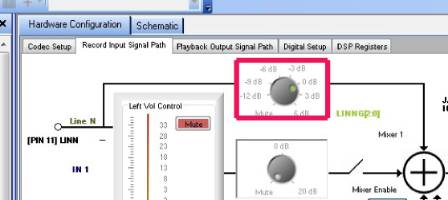
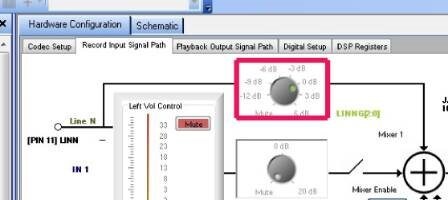
There is no output on my CPALESS HP OUT.
I connected the input signal at the IN 3/4.
Set The VDD on 1,8V, the MCLK SOURSE to USB.
What jumper settings do you use?
Thx.
Perhaps you should try the "Automatic Startup" option in SigmaStudio to make sure the registers are all set up correctly.
The only jumpers that need to be connected are:
J17 (connects AVDD to the board supply VDD)
J16 (connects IOVDD to AVDD)
J5 (connects USB 5 V supply to the board supply)
Switch S5 should be set to OSC for the onboard oscillator.
Switch S1 should be set to 3.3 V.

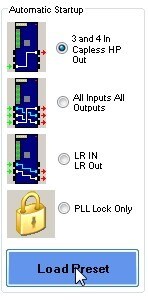
Ok now it works. Many Thanks!
What algorithm does the programm use? Is it a IIR Filter or a FIR Filter?
Now i want to show the characteristic filter curve of a bessel, butterworth, chebyshev low/high pass (500Hz), but the bode plot doesn`t work. Do you have any idea?
All of the filter implementations in SigmaStudio are IIR. Most of them are 2nd-order (although 1st-order filters are available as well). We do have an FIR filter block, but no FIR filter coefficient generation tools.
My function generator has a default output voltage of 5V.
To provide damage, i want to take 2 resistors, to build a voltage devider. Is that possible? What is the input impedance of the MCLK? Found nothing in the data sheet.
Need your help!
The next thing i would like to know, is what coefficients are used for the general-, bessel-, butterworth-, chebychev lowpass.
What orderes do the filters have?
This and the input impedance an my project will be nearly finished.
Hi AndreW
Sorry for the late response. I was out of the office frequently over the past several weeks.
The digital inputs on our ICs typically have very high input impedance (characteristic of the input to an ideal input driver) and low output impedance (characteristic of the output from an ideal output driver). So, the input impedance for the MCLK input pin will be in the range of several 100k Ohms or even megaOhms.
So, using a resistor divider should work OK for scaling down the MCLK signal, but some kind of active driver like a simple level shifter might be the best way to ensure that the signal integrity isn't compromised.
For filter math calculations, please see this thread: https://ez.analog.com/docs/DOC-1819
There are attachments including a list of coefficient calculations and a calculator Excel file.
Please log in to reply.