Wrong Export of Sequence Data ?
Hi everybody,
I'm developing a complex application using an ADAU1761 controlled by a microcontroller (Arduino UNO board).
I have a complex project perfectly working, and I'm trying to export "sequences" to be invoked by the microcontroller.
I followed the explanation of this document: SigmaStudio Basic uC Integration Tutorial.pdf
and downloaded the example zip file.
OK, everything is perfect, except that when I'm exporting my files with the command "Export Sequence Data ..." I get files that are useless.
The problem is that the .h files contain empty function definitions.
Instead of getting sothing like (file "Tone_Modes.h"):
ADI_REG_TYPE TONES_0[4] = {
0x00, 0x00, 0x00, 0x00};
//Declaration of function needs to be automated
void tone_download (){
SIGMA_WRITE_REGISTER_BLOCK( DEVICE_ADDR_IC_1, 0x0010, 6, TONES_0 ); /* StMuxSwSlew1coeffname */
}
where you can see the parameters and function body, I get something like this:
void MODE_0_download(){
}
The body of the function is empty, and of course does nothing. Of course when creating the mode I performed the suitable drag and drop of the sequence lines of interest, and they show in the right pane (so the mode is not empty).
My project uses a "Hierarchy board" in order to subdivide the project and reuse the board in other projects, and I have the impression that something is
not defined due to this fact ( the "IC" column in the sequencer window is always empty, and when reloading the sequence the IDE complaints
that something is wrong regarding the IC, and that a "default" will be used).
Even if I try to download the mode to hardware I have the impression that nothing happens.
Is there something that I can do? Did you ever see such a behaviour, actually empty export sequence files?
Any help would be appreciated.
Regards. Daniele.
Audio Signal Processors
SigmaDSP Audio Processors
adau1761
I want to add more info, I made some tests.
I tried to load the example (ADAU1761_Demo), and to create a mode ( so no problem of Hierarchy boards).
The result is the same, empty function body:
void MODE_0_download(){
}
Thinking of a bug, I tried also with SigmaStudio 3.5.1 beta, same result.
Can it be a problem of configuration of my machine? I have Windows XP pro SP3, Sigmastudio installs properly, no error, and the rest of its functions work.
Included you can find what my system exports as sequence files.
Can anybody help me?
Thank you.
More tests ... I tried SigmaStudio from version 3.1 to 3.5, and also the x64 version of Windows 7 on a different machine.
I see that the export of sequences has changed over time, initially only some .dat files were generated, with register and data in hex form,
then from 3.3 or 3.4 also the .c and .h files of single modes appeared.
But the problem remains the same: empty functions, in all cases.
Is this a reliable function of SigmaStudio, or does it need some special setup or sequence of actions to work?
Thank you.
Well, after a lot of experimentation ... I ALMOST solved the problem myself.
Looks like the problem lies in the IC reference in the sequence. I switched the IC reference to "unassigned" ... and the code came out,
although quite wrong.
Here's a sample:
/*
* File: ProcessingON_Modes.h
*
...
*/
ADI_REG_TYPE PROCESSINGON_0[4] = {0x00, 0x80, 0x00, 0x00};
ADI_REG_TYPE PROCESSINGON_1[4] = {0x00, 0x00, 0x00, 0x00};
void PROCESSINGON_download(){
SIGMA_WRITE_REGISTER_BLOCK( DEVICE_ADDR_, 0x01BE, 6, PROCESSINGON_0); /* stereomux1940ns30 */
SIGMA_WRITE_REGISTER_BLOCK( DEVICE_ADDR_, 0x01BF, 6, PROCESSINGON_1); /* stereomux1940ns31 */
}
As you can see there's a first error, the "DEVICE_ADDR_" part is not complete (shoud be something like DEVICE_ADDR_IC_1),
probably the IC reference should be appended, and now the IC is unassigned ... but if you assign it you get no code at all ....
In this way, in any case, the export is relatively useful, you have to modify the code manually, but you don't have to write it completely from scratch.
Another thing that I notice is that there's a constant in place of the relative #define as the register address ... see 0x01BE in the code above.
This is another thing that should be improved in the export function, I'd prefer seeing the #define of the register here ... it's defined somewhere
in the main export files ... If we have a constant and we modify the signal graph of our system it's almost sure that this number will change (the "register", that is the location of memory where the control number for the algorithm is stored and it will be moved in another location).
Instead, if we use the #define and the name of the processing block is not changed, the function will still compile and work OK when the location is moved.
Hope this helps ....
Regards. Daniele.
Hi Daniele,
Sorry to reply so late. I was in China from July 15th-23rd and I didn't have much time to check the forum.
I was able to confirm the problem you are seeing and I will be sure to report this issue to the software team. It looks like this problem manifested itself when the IC assignment option was added to the sequencer. I will check with the software team to see how we can fix the problem as soon as possible.
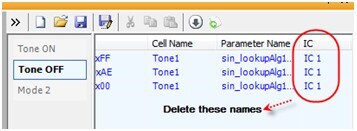
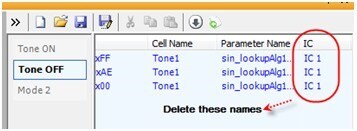
For now, there is a temporary way to fix this problem. Delete the names that appear on the “IC” column on the sequencer window.
We are, of course, working on an actual fix to the issue and that should appear in the next SigmaStudio release.
Hi BrettG,
I'm facing the same problem with latest SigmaStudio 3.4.0 rev724.
Even I don't have these 'IC's defined in my project, I'm not getting the sequence output files.
Attached my simple project where I want to switch between Mono and Stereo.
So, do you have any news on this issue? Has it been reported and when will it be solved.
Or, what I'm doing wrong that I'm not getting the expected output files? :-)
This question has been assumed as answered either offline via email or with a multi-part answer. This question has now been closed out. If you have an inquiry related to this topic please post a new question in the applicable product forum.
Thank you,
EZ Admin
Please log in to reply.