Problem with opening Projects in SigmaStudio 3.3 Beta
Thanks.
I am trying x64 version. And have noticed that it wont open my 3.2 projects.
Will this be fixed?
Cheers
Brett
beta
sigmastudio
SigmaStudio 3.3 (both x86 and x64 versions) should be backwards-compatible with your SigmaStudio 3.2 projects. Is SigmaStudio giving you an error message when you try to open your projects? If you want to send us your .dspproj file, we will look at it to see why you are having this problem.
Hi Jerad
It appears that the problem is Not that i cant open any of my old 3.2 Projects.
But it cant open ANY projects I save. Even in 3.3.
Ie. I start a new project in 3.3 and save it OK.
But then go to Open it..
I tried Bith x64 and x32
I am a full admin of this machine
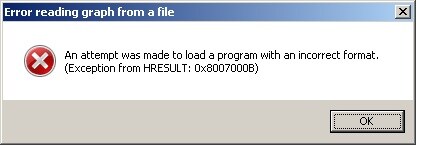
We will look into this problem. When you install SigmaStudio, are you clicking on the setup.exe file, not the .msi file? In order to properly install the software, you should run setup.exe. I've recently updated the SigmaStudio beta announcement post with this information.
Yep That fixed it
I have also noticed that I cannot "wire" up any USB to Chip on the hardware config Tab. And Many USB or Dev Board icons just end up a weird line when I go to put them on the page
On the Schematic Page its all fine..
Thanks
Brett
I'm not clear what you're trying to do wiring "any USB to Chip on the hardware config Tab." For most uses, you'll just want to connect the USBi block to the SigmaDSP processor you're using and this is all that's needed to set up your communication channel. Most of the other eval boards and other communication channels in the library are there for legacy support. If you're using a USBi board, then that's the only block that you'll need from that list.
Hi
I use the legacy 1941 dev board
If I use that it wont "wire" on the screen to the AD1941 chip on the hardware page.
Same thing occurs for many Legacy dev board icons.
The USBi icon DOES work though
Cheers
Brett
Even though you're using an AD1941 evaluation board, are you still using the USBi for your communication to the board? For all current and future developments, we're recommend that you use the USBi instead of any of the older, on-board USB or parallel port communications. We are not testing the older interfaces on new builds of SigmaStudio, so we can't guarantee that anything other than the USBi will work for you in Windows 7.
Please log in to reply.