UpLoad E2Prom to File & DownLoad File to E2Prom
For some reason when I try to download a file that I have previously uploade from the E2Prom, I get an unhandled exception. If I Select "Display File" it appears that 16-byte line numbers have been added to the data (no 'Address Visiable' check mark). The line numbers show up diagonally through the data in the display. I am pulling my hair out! Any suggestions would be much appreciated.
Ray
sigmastudio
Hi Ray,
I'm seeing this problem as well. It looks like a bug with the E2Prom window, so I'll discuss with the software team. I think any buttons related to the display have the potential to corrupt the data in some way, for example by adding address numbers.
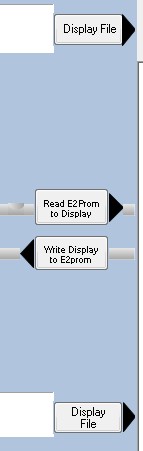
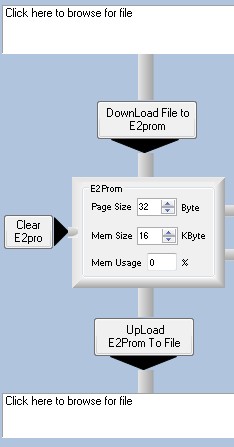
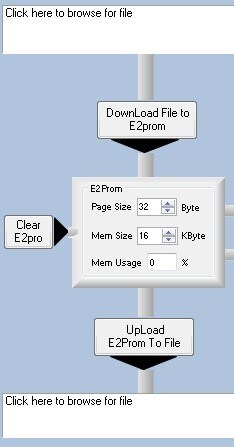
So, for now, please do not use these controls:
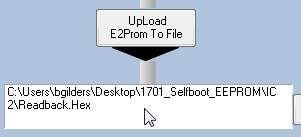
Instead, only use these controls:

Brett,
Thanks for the reply. I hope the software team can come up with a quick solution. We are scheduled to begin poduction in two weeks and we need an easy method of checking/verifying load on the production line.
Ray
I'm not sure about the software team's workload at this moment, so I can't guarantee that it will meet your schedule. To be safe, I would recommend the following method to check the EEPROM contents.
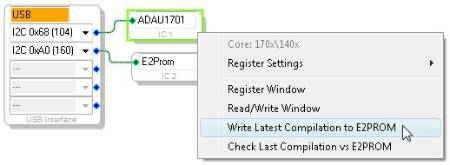
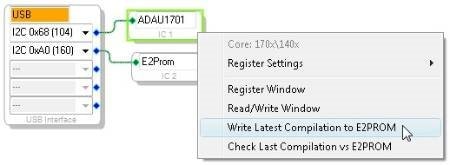
Use the "Write Latest Compilation to E2PROM" command to program your EEPROMs.
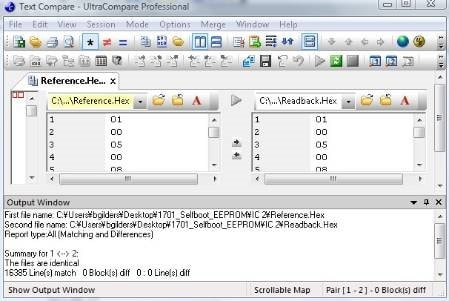
Readback from a known working unit using the E2PROM window. Save this file as Reference.hex.
Now, readback the memory from production units, and name the file Readback.hex.
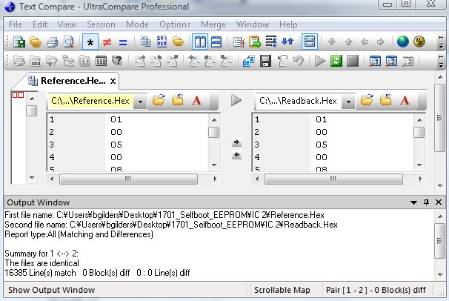
Use a program like UltraCompare to confirm that the readback file and reference file match.
This question has been assumed as answered either offline via email or with a multi-part answer. This question has now been closed out. If you have an inquiry related to this topic please post a new question in the applicable product forum.
Thank you,
EZ Admin
I am very happy to see this content. I also met no response when using the function of "Upload E2prom to file". I can see that you can demonstrate it here. I've tried many versions that don't work! Thank you very much!
Hello,
Please could you tell me what was the solution for your issue? I have the same problem with the readback file. It does not work for me in the SigmaStudio 4.5.
Thank you!
Gabor
Hello Gabor,
Please create a new post and give us more background to you problem. What you have tried and what exactly didn't work . That must be a easy way for us to answer. Because this post was created 12 years ago and the current system is different than a system a decade ago and tell us which processor you are using.
Regards
Harish
Hello Harish,
Here you can find my new post with details:
Upload e2prom to file does not work in Sigma Studio 4.5
Thanks,
Gabor
Please log in to reply.