ADAU1445 Selfboot
Hello Brett,
I have just discover this forum.
I checked that the problem that I have with my eval-board (ADAU144x) is not something new. I can not work in self-boot mode.
I follow the steps that I found in this forum but I my eval-board doesn't work jet.
I tried to write two times the E2PROM, also I modified the "Start Pulse Select" register by 0x01 (my sample frequency is 96KHz).
I install again the software with the last version from your website (both beta and current release are the same version, right?). No way.
Do you have any idea but what is wrong?
Thank you for your help.
Audio Signal Processors
eeprom
adau1445
sigmastudio
SigmaDSP Audio Processors
selfboot
Show More
Hi Inma,
Nice to see you on the forum. Did you try the manual or automatic method?
Hello Brett,
Nice to hear you.
We are ADAU1701's user. Right now we have three or four design working wiht your ADAU1701.
With and without internal DAC's working.
At the factory we programming the dsp using a PC connection.
When the dsp has been programming, we change it to the self-boot mode using a jumper which put 3.3V on the self-boot dsp pin.
Now, I'm working with the new ADAU1445 dsp.
My problem is that I can not work in self-boot mode.
I install again the Sigma-Studio (S-S) software (last version from you website) because I read in this forum that you had some pb with the ADAU1445 and the old S-S version.
Things that I did:
1.- link-Compile-Download --> Write the last download on E"PROM --> check E2PROM --> change S2-6 pin on the eval board --> reset DSP --> play music. Doesn't work.
2.- link-Compile-Download --> find and open eprom.hex file --> modify 0x1C to 0x01 (I work 96Khz) -->save the file--> Write the last download on E2PROM --> check E2PROM --> change S2-6 pin on the eval board --> reset DSP --> play music. Doesn't work.
3.- link-Compile-Download --> find and open eprom.hex file --> modify 0x1C to 0x01 (I work 96KHz) --> save the file--> open E2PROM window --> find the eprom.hex file modify --> download to E2PROM --> read E2PROM on the white window--> change S2-6 pin on the eval board --> reset DSP --> play music. Doesn't work.
I verify that the E2PROM size is the good one for my aplication, even more right now I'm doing the test with a simple program (just input music and output music with gain).
Any idea will be welcome.
Thank you.
Hello Inma,
I don't have any eval board, but I've bulit a pcb around adau1445 myself. The selfboot-part of my design is based on adau1702 eval board's datasheet. (I'm using the beta version of SigmaStudio!)
I recognised the same problem, with my adau1445 board and now I'm using the selfboot function as follows:
I set the selfboot jumper, so selfboot pin is attached to GND. So the jumper is set, every time also when I upload to eeprom and also when the DSP selfboots. With this setup I can upload the sketch to the eeprom(the verification also passes), and If I press the reset button, the DSP selfboots from the eeprom. I'm not sure why and how, because all the FAQs and other descriptions says it should not work so.
It could be that some strange happens with my board, because I can only use the gpio pins, and I can't create any sound with the DSP...
By the way could you write for me your register settings? I enabled MCLK for the core, and for the SerialOutputs, but I cannot hear any sound altough I connected a sine generator to the output. I can see the clocks are ticking on the scope, but the SerialOutput is dumb. (I'm using adau1445 as a master, only one ClockOutput is enabled and all the SerialOutputs are set to 48kHz master)
Tamas
I've made some experiments...
The really strange thing is, that the selfboot worked for me also when the selfboot pin was attached to GND or to VCC.
the experiment's steps are the following:
a)Selfboot to GND.
b) switch LED on in SigmaStudio.
c) write latest compilation to eeprom
d) switch LED off in SigmaStudio
e) reset adau1445 ---> the LED lights! (so selfboot worked)
I've made that also with selfboot attached to VCC and the LED also lighted after reset....
Can anybody explain that?
Tamas
Hi everyone,
Sorry for my late response. I just relocated to a different office, so I have been busy with the move and I wasn't able to check the forum for a few days.
I shipped my evaluation boards to the new office; they should arrive on Monday. Once I get the ADAU144x board, I'll confirm the self-boot operation and then create a step-by-step guide for you to duplicate it on your board.
Hi Brett, nice to hear you.
Ok, waiting for you.
Thank
Hi,
Any news about that, ......
Thank you
Hi Inma,
My boards arrived yesterday and I tried this out. The self-boot function worked without any issues in my 96 kHz test project.
Please follow the instructions for "Method 1 : Automated Generation / Download" in this thread.
I followed the instructions exactly and saw proper self-boot behavior. I've attached my example project that makes the LEDS on the GPIO board blink and outputs a sine tone on SDATA_OUT0. Please try it on your board.
Thanks,
Brett
Hi Brett
Thank You for your time.
The question is not really how I have to do to program the eeprom on my eval-board.
This is OK and could check by different ways that everything is well done. My eeprom is programmed.
My problem is after that, when I try to start my eval-board in a Selfboot mode moving the jumper 6 on the S2 switch.
No way to start to work.
At the beginning, I develop my application with the SigmaStudio software but my eval-board didn't work in a selfboot mode, so I thought that maybe I was overloading the eeprom. I created a simply one just input to the output through a gain level and nothing.
I can read my eeprom after programming it and it seems that everything is fine.
Any idea.
Thank you, Inma
Inmaculada Herrera Hernández
Electronic Engineer
Factory Technical Support
Islas Baleares, 24
46988 - Fuente del Jarro. Valencia
Tel. +34 96 134 0206
Fax +34 96 134 0607
www.dasaudio.com
Hi Inma,
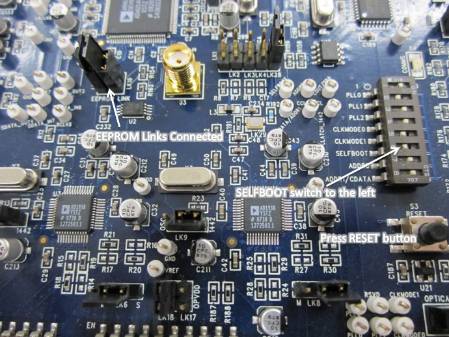
Does your setup match this picture?
Hi Inma,
The root cause was found. The pull-up resistors on the USBi are not sufficient to help the ADAU144x selfboot from the EEPROM. You'll need to populate R164 and R165 on you eval board with 2 kΩ resistors.
The position of those resistors is highlighted here in red.
3201.bb75dab99362be02b442776a2d031504.jpg
Please log in to reply.