ADAU1446, SERIAL_OUT management
Hello,
I'm using ADAU1446, and I use 4 outputs whith TDM2, I2S signals. They all share the same bit clock.
They are put on SDATA_OUT0,SDATA_OUT1,SDATA_OUT2,SDATA_OUT3
So I output clock, master, fs normal for SDATA_OUT2 on LRCLK11 and BCLK11. So far so good.
Register 0xE042, master, clock is fS,NORMAL and Clock output enable
But for 3 other data, what config should I set ?
I have try "slave to Clock Domain 11". But it doesn't work, no data outputed on SDATA_OUT0,1,3
Should I configure master, clock is fS,NORMAL, without Clock output Enable ? It seems the good solution, but datasheet say this (p43) :
>Clock Domain Master/Slave Select Bits (Bits[13:10])
>These bits set whether the serial port outputs its clocks as a master or slave to an available clock domain. If a serial port is set to be a master, the clock >output enable bit (Bit 15) must be set to 1. If a serial port is set as a slave, the clock output enable bit (Bit 15) must be set to 0. In both cases, the >corresponding clock pad multiplexer must be set to the serial output domain, if assignable. For more information, see the Clock Pad Multiplexer section. >Note that an arbitrary number of serial ports can be slaves to a single clock domain, but a single serial port can only be a master to one clock domain. >The values for fS,NORMAL, fS,DUAL, and fS,QUAD are 48 kHz, 96 kHz, and 192 kHz, respectively, for a 172.032 MHz core clock signal.
So config with master and no output seem to be not legitimate ?
Thanks for answer !
Audio Signal Processors
adau1446
SigmaDSP Audio Processors
I reply to myself. I've tried with master with no output for 3 out. It seems to work.
I dont' know if this beahaviour is legitimate ...
Hi Bat,
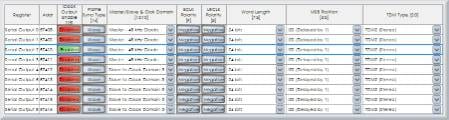
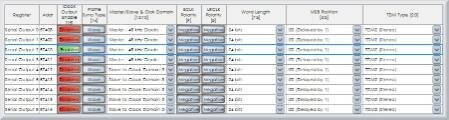
I'm sorry for the late response. I forgot to reply to your question last week. If all of your data outputs will be synchronous, you only need to have one BCLK and LRCLK clock pair associated with them. In your case, it seems that you are operating in master mode (i.e. the ADAU1446 is the clock master), so this greatly simplifies the process. You simply need to set all of the serial ports in use to "48 kHz Master" using the Clock Domain Master/Slave Select Bits [13:10]. You can then use the Output Clock Enable bit [15] to turn one clock output on and the other 3 clock outputs off.
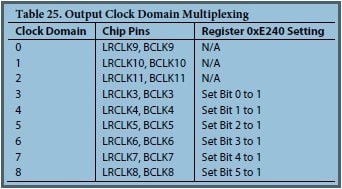
This table in the datasheet shows the PORT to CLOCK pin alignments when operating in master mode.
So, you can see that setting serial output port 2 to master will give you clocks outputting on BCLK11 and LRCLK11.
This configuration should match your setup:

Ok, it's what I have done. Thanks !
Just, the datasheet is a bit confuse about the fact that when in master mode, clock output must be enable. In this case, it must be enable for one way, not the three other one.
Please log in to reply.