Problem with exported data not containing references to modules
Hello,
I am implementing a project using the ADAU1761 SigmaDSP and have a couple of questions regarding it.
1.
I have a DSP readback in my project and when it all works fine in the project after comiplation and download but when i export the project there is no reference to the DSP readback device at all in the exported files specifically the PARAM.h where address information about the modules are stored.
When developing using the 1701 SigmaDSP containing a DSP readback the exported files contain a reference to the readback control.
if anyone can help with getting the ADAU1761 project to export the readback information it would be very much appreciated.
2.
This may not be a problem but when i use a Value Hold module in a 1701 and 1761SigmaDSP project there is no reference to it in the exported files. I was wondering if i could read directly from the hold register of the module but there is no reference to it anywhere. I presume that the data is not stored in the parameter RAM but elsewhere.
if anyone could pointout if its possible to read the a Value Hold value that would help me a lot.
many thanks for any help
Alan
Audio Signal Processors
SigmaDSP Audio Processors
adau1761
Hello Alan,
I apologize for the long response time.
First of all, please make sure you're updated to the latest version of SigmaStudio from our download page.
1. I am actually seeing references to the readback cell in the parameter map, but not the generated header files. I have attached a project file. Please try compiling it and downloading to your hardware, then export the system files to see if you get the same result.
In ParamAddress.dat, I see:
NonModRamAlloc 0
dataLoadStart_SafeLoad 1
dataLoad1_SafeLoad 2
dataLoad2_SafeLoad 3
dataLoad3_SafeLoad 4
dataLoadEnd_SafeLoad 5
addressLoad_SafeLoad 6
numLoad_SafeLoad 7
MonoRunAvgDetectAlg1RMS_1 8
MonoRunAvgDetectAlg1hold_1 9
MonoRunAvgDetectAlg1decay_1 10
ReadBackAlgSigma2001_2 11
In Param.h, I do not see a reference to the readback cell. This is a problem. I will report this to the software team.
2. The value hold cell does not have any user-configurable parameters that are stored in parameter RAM. This is why it has no references in the output files. In order to read back the values of the input or output pins (stored in data RAM), insert a DSP readback cell in the appropriate spot, which will assign it a spot in parameter RAM that you can read back directly.
Brett,
Is it possible to include the USER MODIFIABLE block name in ParamAddress.dat?
As an example for the following line
ReadBackAlgSigma2001_2 11
would become
ReadBackAlgSigma2001_2 GPIO0_Readback 11
GPIO0_Readback is the edited name in the field just below the block.
The ParmAddress.dat file could be parsed to extract the variable addresses - with names more meaningfull to the programmer.
Parsing of this file is necessary - as design blocks are removed and added, the register addresses change.
A parsed file could simply generate the following:
#define GPIO0_Readback 11
In my case, I wrote a translator that parses the .xml file into a .h file that is included in the application.
I've attached the .xml and .h files for a simple sine oscillator.
Bob,
The Params.dat file uses the internal names for the algorithms, but you can try using the "Export System Files" command in the main toolbar to generate C-compatible header files automatically from SigmaStudio.
The file IC1_PARAMS.h includes listings for the parameter address of each cell. The naming convention is
MOD_HierarchyPageName_UserAssignedAlgorithmName_AlgorithmNumber_ParameterName.
Here's an example:
#define MOD_FILTERS_EQFILTERS_ALG0_IDXSELINDBANALG100B20_ADDR 146
This cell is located on the "Filters" hierarchy page, with an algorithm name "EQFilters."
Brett,
I believe you're missing the point....
The problem with that solution is that the algorithm names do NOT appear anywhere in the SCHEMATICS. Correlating a block with driver code references in source code requires the user to find the algorithm name in the capture window for each controllable parameter and reference that algorithm name in his/her code. So, if I'm looking at the schematic of my design, how do I know which block is ALGORITHM_SO_AND_SO?
However, if the Cell_Name is used in the include file, one would set the name to a more USEFUL one, such as Sub_Mix1_Level1, and that name would be used in the source code. From a design documentation point of view, this method would be preferable, at least to me.....
In my design, I have the following parameter names:
DCInpAlg23_0
DCInpAlg4_14
TriAlg1_p1_26
Gain1940AlgNS6_46
EQ1940Invert4gain_65
SWGain1940DBAlg1target_92
These names are meaningless, as they really don't describe the function FOR THE APPLICATION.
Hi Bob,
I'm still not entirely sure why the PARAM.h file generated by SigmaStudio isn't accomplishing what you're looking for. Please take a look at the additional attached example. Hopefully we can figure out exactly where we are having a misunderstanding.
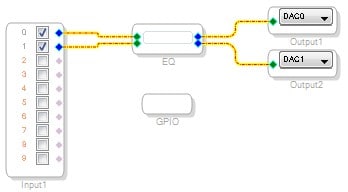
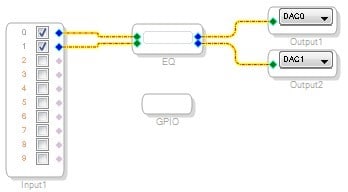
I created a quick project. It has two hierarchy boards, although in a complicated design I expect you might have many boards and several layers of hierarchy. I named the first hierarchy board "EQ" and it contains a double-precision HPF and an FIR filter. I named each of those appropriately for the application. I also created an LED on/off switch in the GPIO hierarchy.
Of course, these cells have several parameters that can be controlled by the user. However, those parameter names are fixed and cannot be modified. These parameter names are enumerated in the case of multiple instances of a single algorithm in a project.
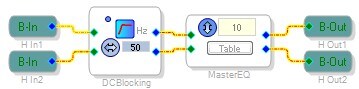
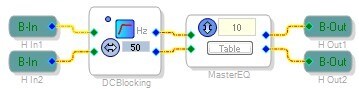
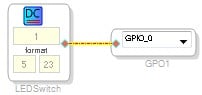
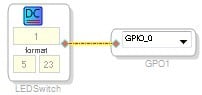
The user-modifiable algorithm names and hierarchy board names can be freely selected, as long as they each have unique names within their hierarchy. My HPF is used for blocking the DC component of the signal, so I named it "DCBlocking." The FIR filter is for master equalization, so I named that "MasterEQ." The DC source turns the LED on or off, so I named it LEDSwitch.
Here are pictures of those cells with their names:
When I compile the project, the parameter names are enumerated and the compiler outputs spi_map.dat, which contains a list of these parameters. Like you said, it's not terribly useful because it simply contains the names of the parameters themselves, with no references to the actual use of that parameter in the given application. This is essentially a compiler log. It is difficult to use this file in your firmware implementation except for very simple projects.
DCInpAlg1_1 0
EQ1940Dual10B1_4 1
EQ1940Dual11B1_4 2
EQ1940Dual12B1_4 3
EQ1940Dual11A1_4 4
EQ1940Dual12A1_4 5
FIRAlg2fircoeff_0_5 6
FIRAlg2fircoeff_1_5 7
FIRAlg2fircoeff_2_5 8
FIRAlg2fircoeff_3_5 9
FIRAlg2fircoeff_4_5 10
FIRAlg2fircoeff_5_5 11
FIRAlg2fircoeff_6_5 12
FIRAlg2fircoeff_7_5 13
FIRAlg2fircoeff_8_5 14
FIRAlg2fircoeff_9_5 15
FIRAlg1fircoeff_0_6 16
FIRAlg1fircoeff_1_6 17
FIRAlg1fircoeff_2_6 18
FIRAlg1fircoeff_3_6 19
FIRAlg1fircoeff_4_6 20
FIRAlg1fircoeff_5_6 21
FIRAlg1fircoeff_6_6 22
FIRAlg1fircoeff_7_6 23
FIRAlg1fircoeff_8_6 24
FIRAlg1fircoeff_9_6 25
The PARAM.h file, on the other hand, contains all of the info I need for implementing my firmware... no capture window required. Here is the LED switch as an example:
/* Module LEDSwitch - DC Input Entry*/
#define MOD_GPIO_LEDSWITCH_COUNT 1
#define MOD_GPIO_LEDSWITCH_DEVICE "IC1"
#define MOD_GPIO_LEDSWITCH_DCIALG1_ADDR 0
#define MOD_GPIO_LEDSWITCH_DCIALG1_FIXPT 0x00800000
So you can see in the define statement, the cell is defined as follows:
MOD ("module")
GPIO (the hierarchy page on which it is located)
LEDSWITCH (the custom name I've given the cell in the schematics)
COUNT (the subcount of the algorithm within this cell)
DEVICE (the IC in the project that uses this cell... only used for multiple-IC projects)
DCIALG1 (the name of the parameter used by the compiler)
ADDR (address of the parameter in decimal)
FIXPT (default value of the parameter in hex).
So, there really is freedom here to name your hierarchy boards and cells as you see fit, and those names will automatically be included in the defines. The only thing you cannot freely name is the actual parameter. If SigmaStudio gave you that level of freedom, it would be troublesome... for example, giving a custom name to every single coefficient in a 10-band EQ).
In my example, the high pass filter has the following parameter definitions, which include the hierarchy name, cell name, and parameter names, so I can set them all up in my firmware without needing to rely on the capture window.
/* Module DCBlocking - General (2nd order)*/
#define MOD_EQ_DCBLOCKING_COUNT 5
#define MOD_EQ_DCBLOCKING_DEVICE "IC1"
#define MOD_EQ_DCBLOCKING_ALG0_STAGE0_B0_ADDR 1
#define MOD_EQ_DCBLOCKING_ALG0_STAGE0_B0_FIXPT 0x007F68B3
#define MOD_EQ_DCBLOCKING_ALG0_STAGE0_B0_VALUE SIGMASTUDIOTYPE_FIXPOINT_CONVERT(0.995382689587065)
#define MOD_EQ_DCBLOCKING_ALG0_STAGE0_B0_TYPE SIGMASTUDIOTYPE_FIXPOINT
#define MOD_EQ_DCBLOCKING_ALG0_STAGE0_B1_ADDR 2
#define MOD_EQ_DCBLOCKING_ALG0_STAGE0_B1_FIXPT 0xFF012E9A
#define MOD_EQ_DCBLOCKING_ALG0_STAGE0_B1_VALUE SIGMASTUDIOTYPE_FIXPOINT_CONVERT(-1.99076537917413)
#define MOD_EQ_DCBLOCKING_ALG0_STAGE0_B1_TYPE SIGMASTUDIOTYPE_FIXPOINT
#define MOD_EQ_DCBLOCKING_ALG0_STAGE0_B2_ADDR 3
#define MOD_EQ_DCBLOCKING_ALG0_STAGE0_B2_FIXPT 0x007F68B3
#define MOD_EQ_DCBLOCKING_ALG0_STAGE0_B2_VALUE SIGMASTUDIOTYPE_FIXPOINT_CONVERT(0.995382689587065)
#define MOD_EQ_DCBLOCKING_ALG0_STAGE0_B2_TYPE SIGMASTUDIOTYPE_FIXPOINT
#define MOD_EQ_DCBLOCKING_ALG0_STAGE0_A1_ADDR 4
#define MOD_EQ_DCBLOCKING_ALG0_STAGE0_A1_FIXPT 0x00FED0B3
#define MOD_EQ_DCBLOCKING_ALG0_STAGE0_A1_VALUE SIGMASTUDIOTYPE_FIXPOINT_CONVERT(1.99074405950505)
#define MOD_EQ_DCBLOCKING_ALG0_STAGE0_A1_TYPE SIGMASTUDIOTYPE_FIXPOINT
#define MOD_EQ_DCBLOCKING_ALG0_STAGE0_A2_ADDR 5
#define MOD_EQ_DCBLOCKING_ALG0_STAGE0_A2_FIXPT 0xFF812DE7
#define MOD_EQ_DCBLOCKING_ALG0_STAGE0_A2_VALUE SIGMASTUDIOTYPE_FIXPOINT_CONVERT(-0.990786698843211)
#define MOD_EQ_DCBLOCKING_ALG0_STAGE0_A2_TYPE SIGMASTUDIOTYPE_FIXPOINT
BobWalker wrote:
The problem with that solution is that the algorithm names do NOT appear anywhere in the SCHEMATICS. Correlating a block with driver code references in source code requires the user to find the algorithm name in the capture window for each controllable parameter and reference that algorithm name in his/her code. So, if I'm looking at the schematic of my design, how do I know which block is ALGORITHM_SO_AND_SO?
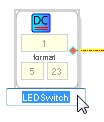
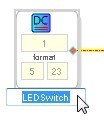
If I understand this correctly, all you're missing is clicking the cell name and manually inputting your name of choice. Here's an example of editing a cell name:
This question has been assumed as answered either offline via email or with a multi-part answer. This question has now been closed out. If you have an inquiry related to this topic please post a new question in the applicable product forum.
Thank you,
EZ Admin
Please log in to reply.