Read from ADAU1761 over SPI
Hello EZ Community, I am trying to setup the ADAU1761 using SPI on our prototype board.
So far I’ve had no success setting it up or reading from it. Initially i tried reaching out to technical support but was told that EZ was the place for sigma studio and ADAU1761.
Please bear with me, and guide me, as i am new to many aspects of this.
Please suspect very elementary mistakes as i am new to this!
-i share a few oscilloscope screendumps as well as a lot of zoom-ins in the end of the post to enable scrutiny of the signals, syntax and chronology.
Relevant information:
--------------------------------------------------------------------------------------------------------------------------------------------------------------------------------------------------------------------------------------
MCU: PIC32CM5164LE00 using SERCOM1 through the harmony framework in MPLAB
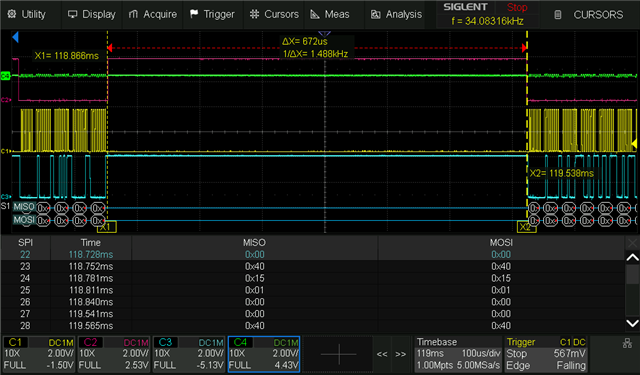
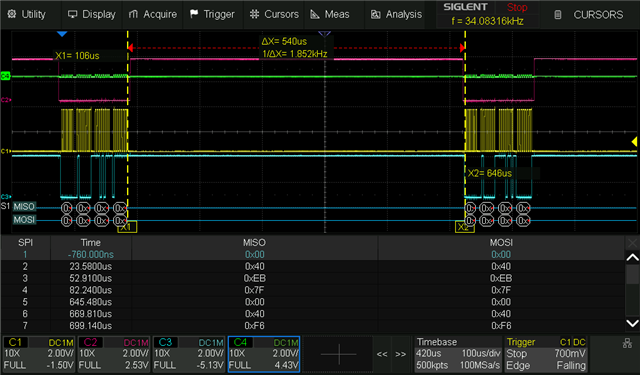
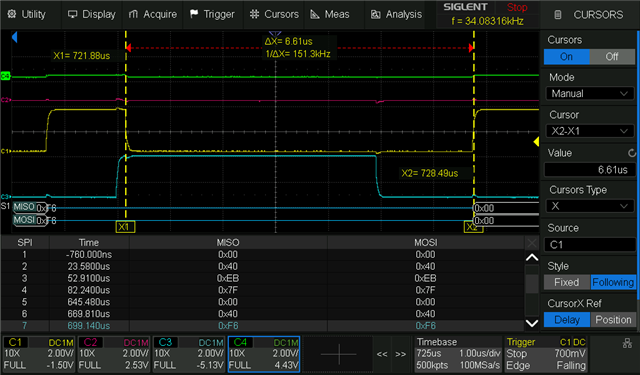
Reading the oscilloscope measurements:
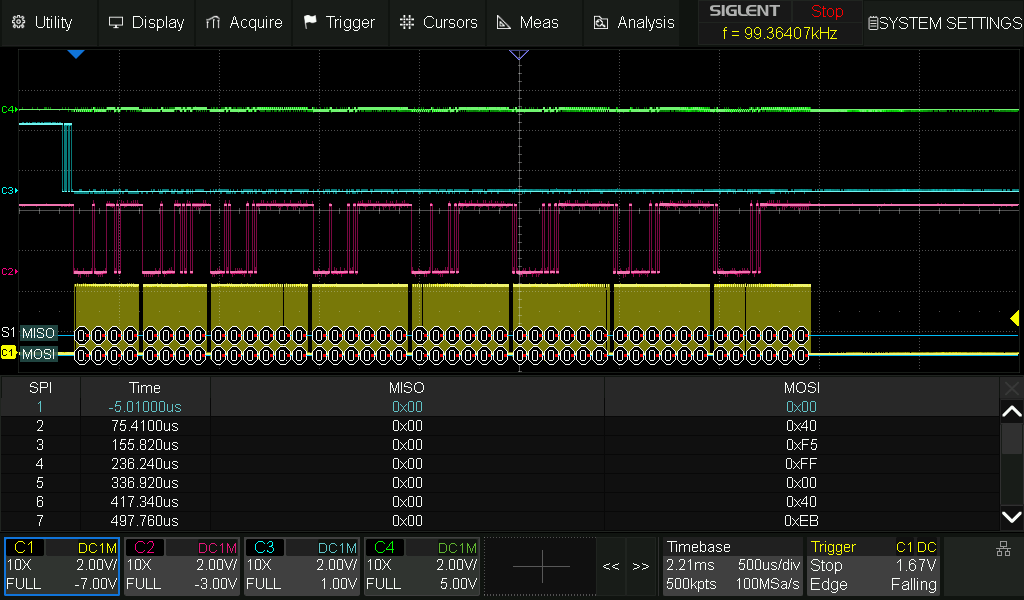
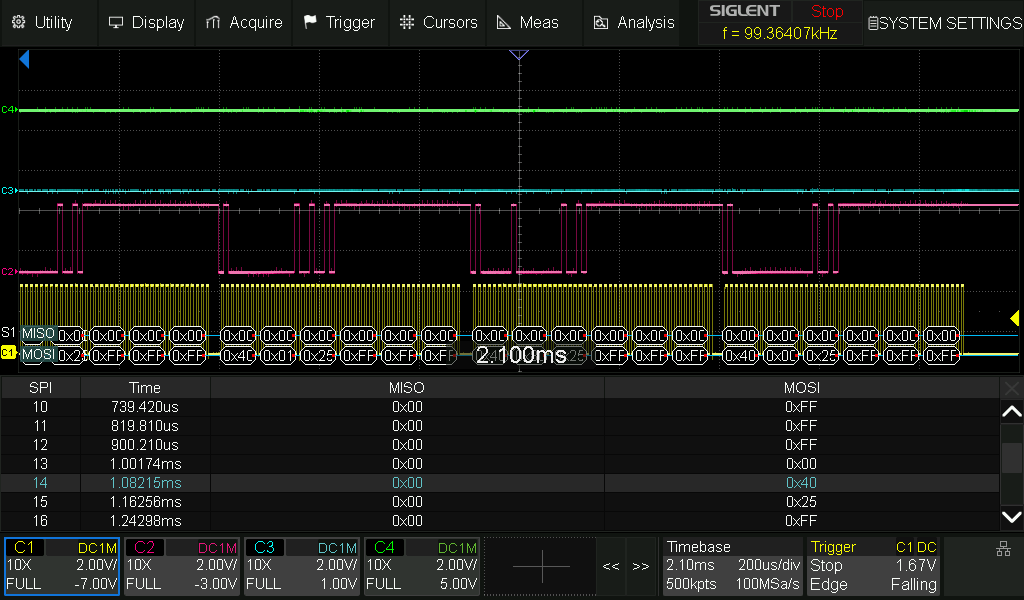
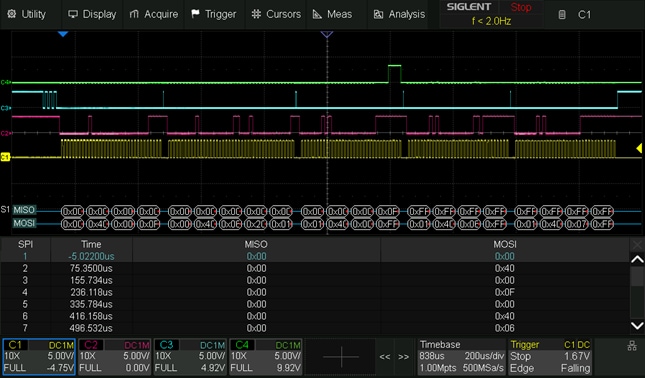
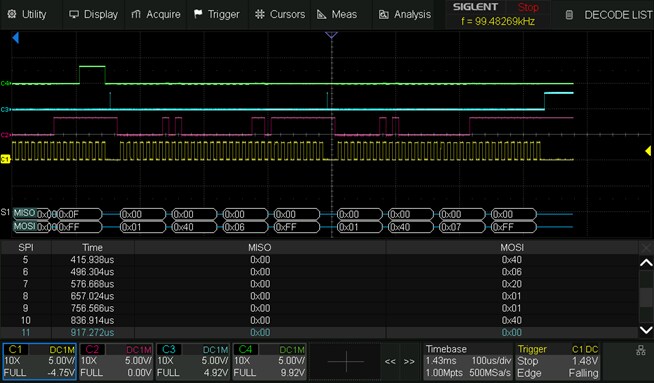
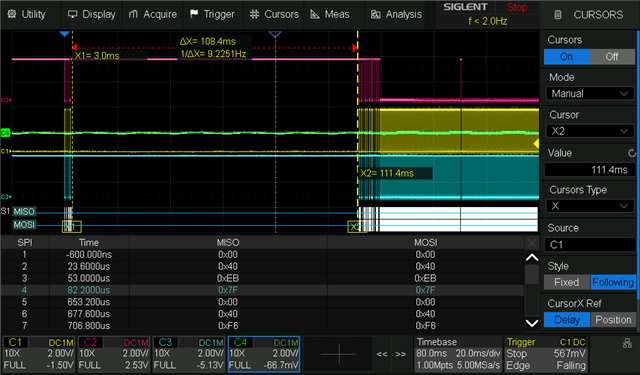
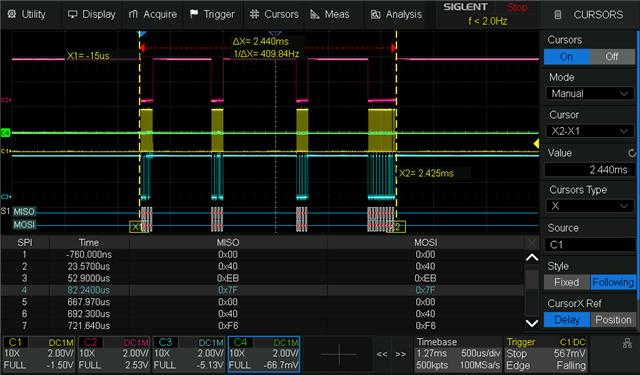
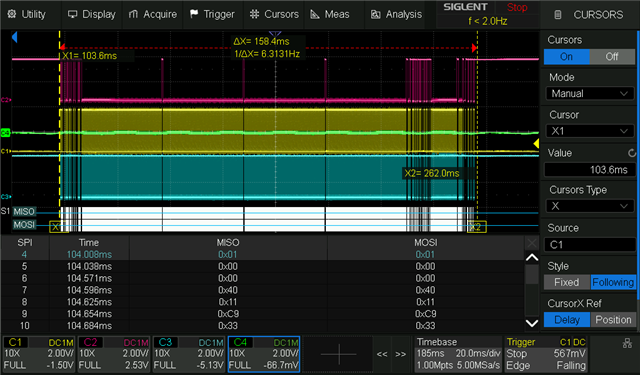
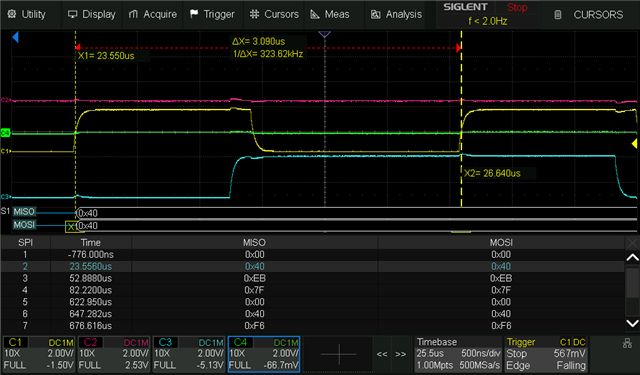
Green C4 is COUT
Teal C3 is /CLATCH
Magenta C2 is CDATA
Yellow C1 is CCLK
S1 MOSI/MISO is the oscilloscopes translation of the SPI communication
--------------------------------------------------------------------------------------------------------------------------------------------------------------------------------------------------------------------------------------
Programming over SPI
Initially I tried programming it over SPI, without success, with or without the startup procerdure. The ADAU1761 should, with this verified program, output a sine wave on one of its outputs when the programming is successful. It outputs DC indicating that my program is not loaded correctly. The program, and resulting behaviour, has been verified on the devkit, programmed using sigma studio, which made the ADAU1761 output the sine wave where specified. This was done by the hardware department. here's the two ways I've tried to program it:
↑cold load the program↑
↑do the recommended startup procedure before loading program↑
Try reading as verification of SPI syntax
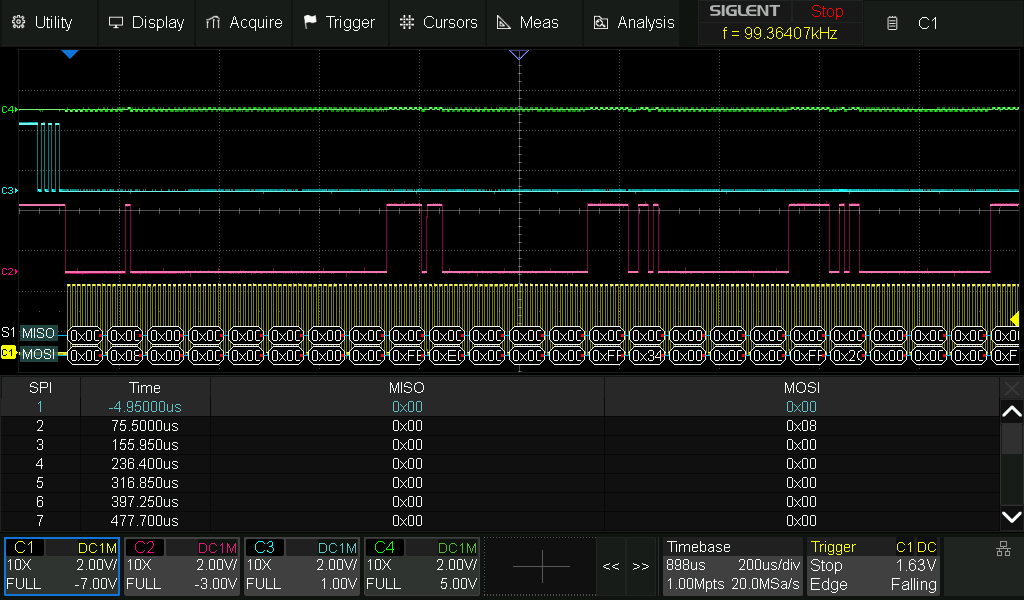
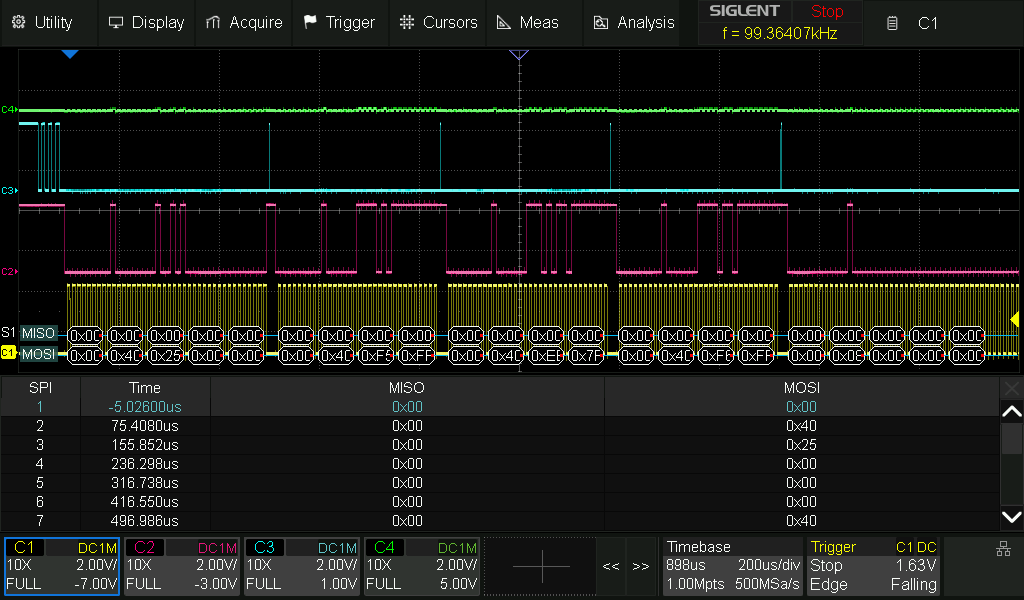
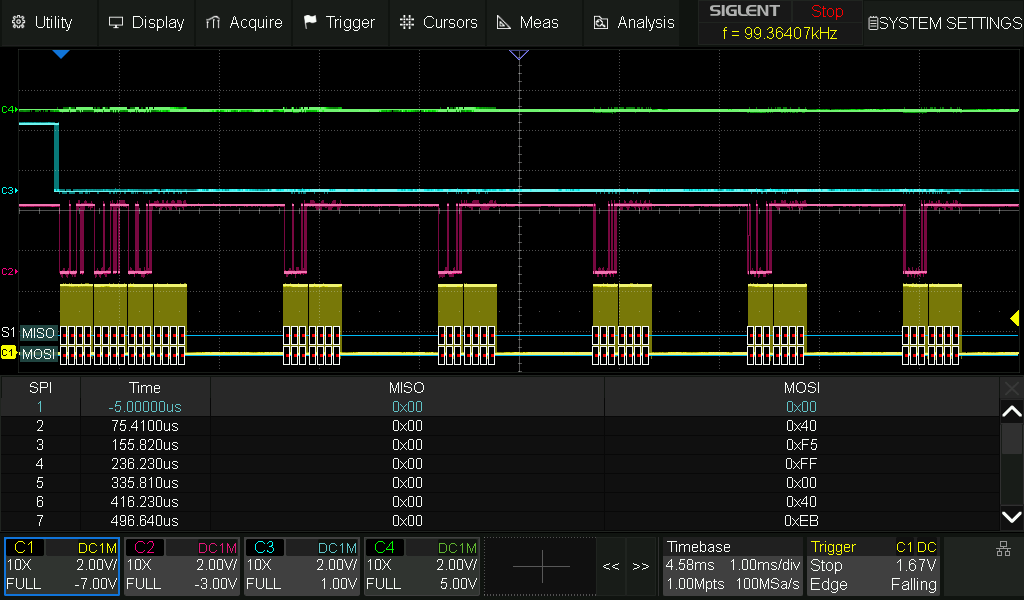
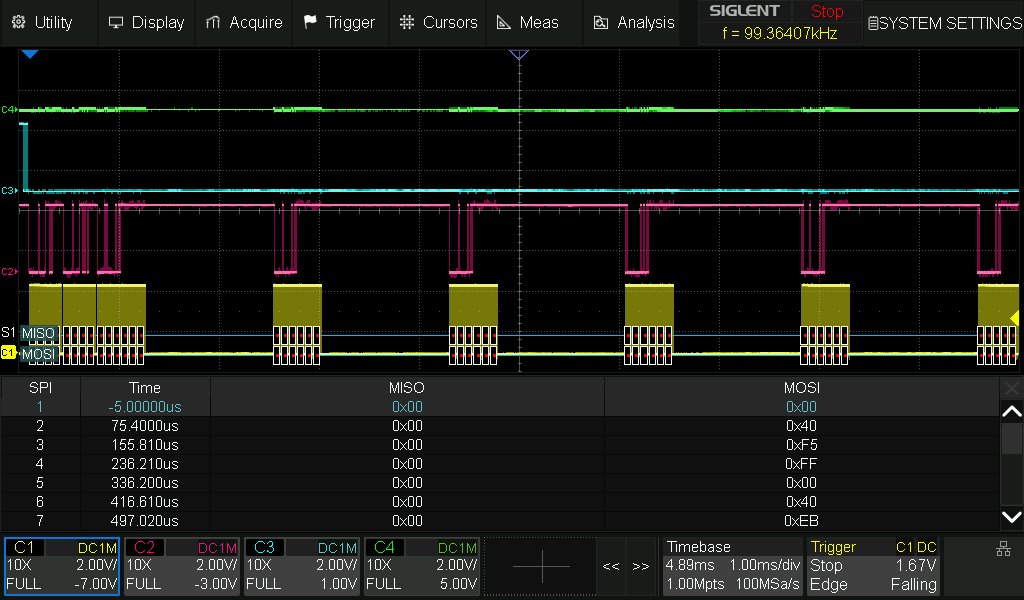
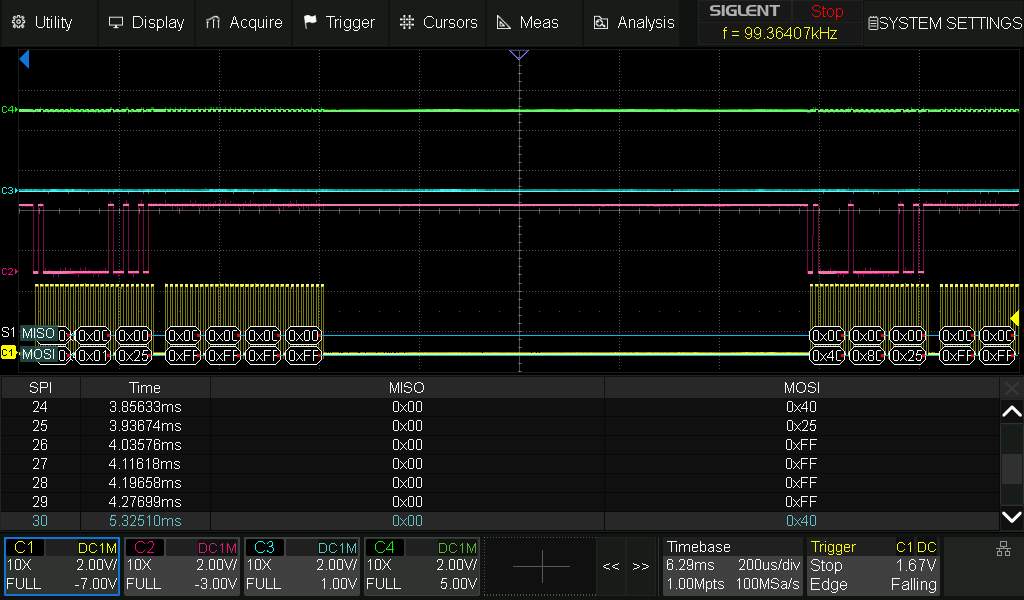
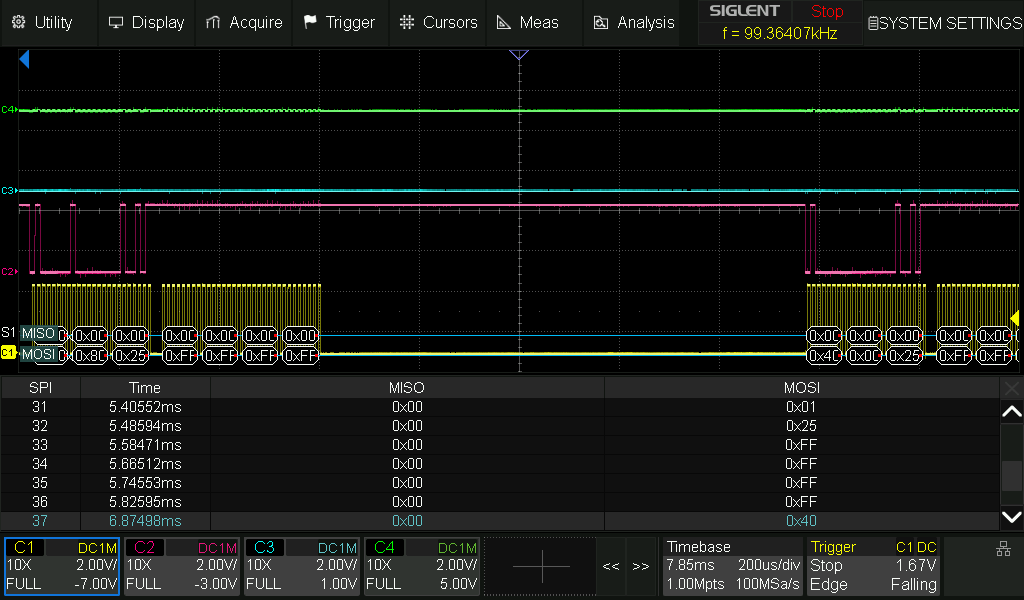
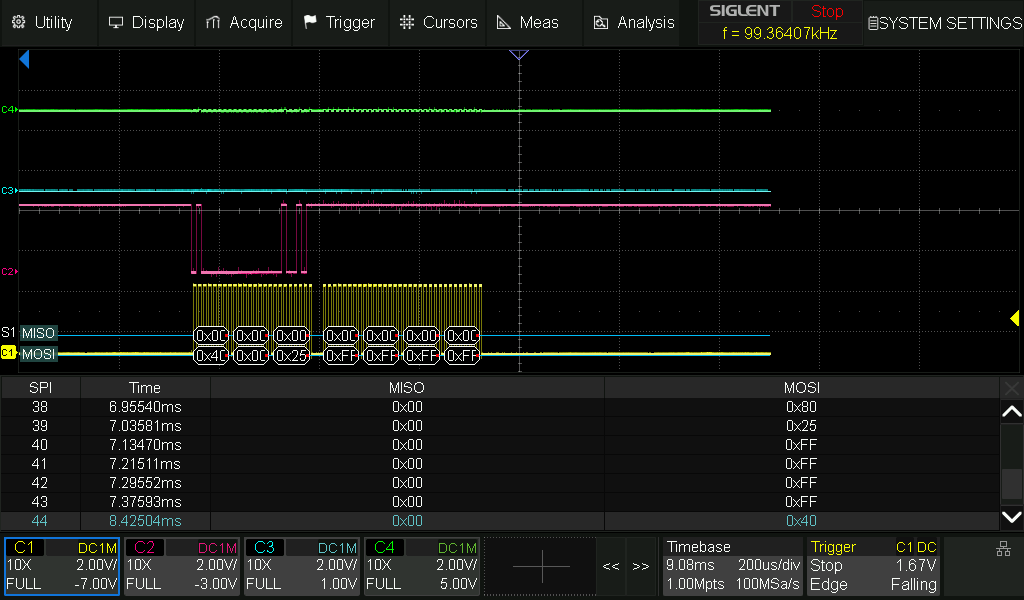
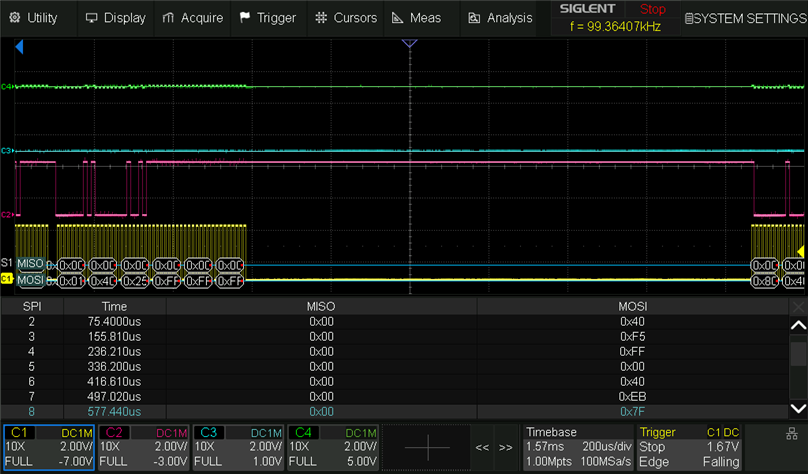
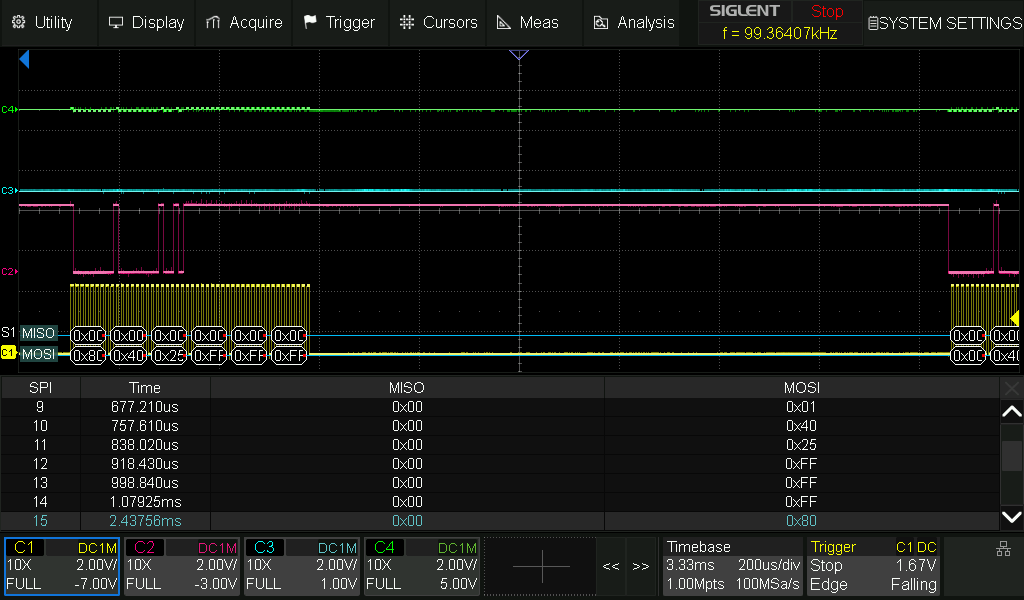
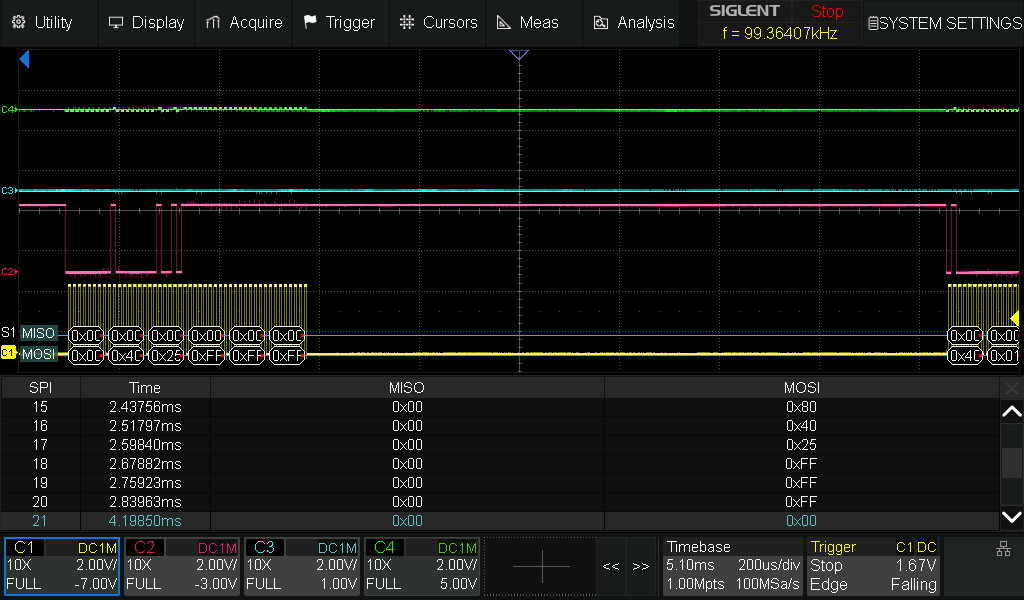
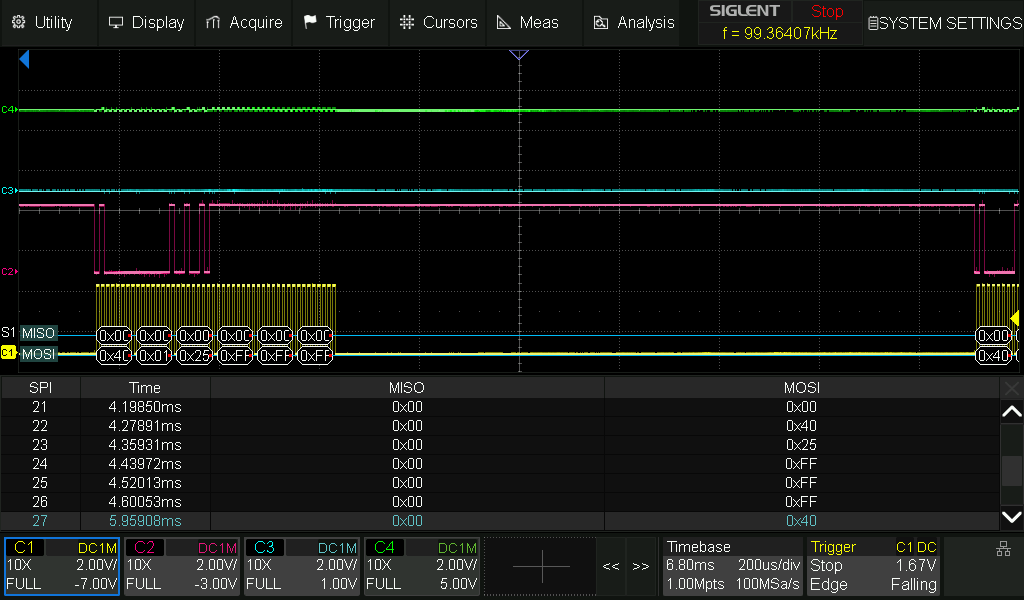
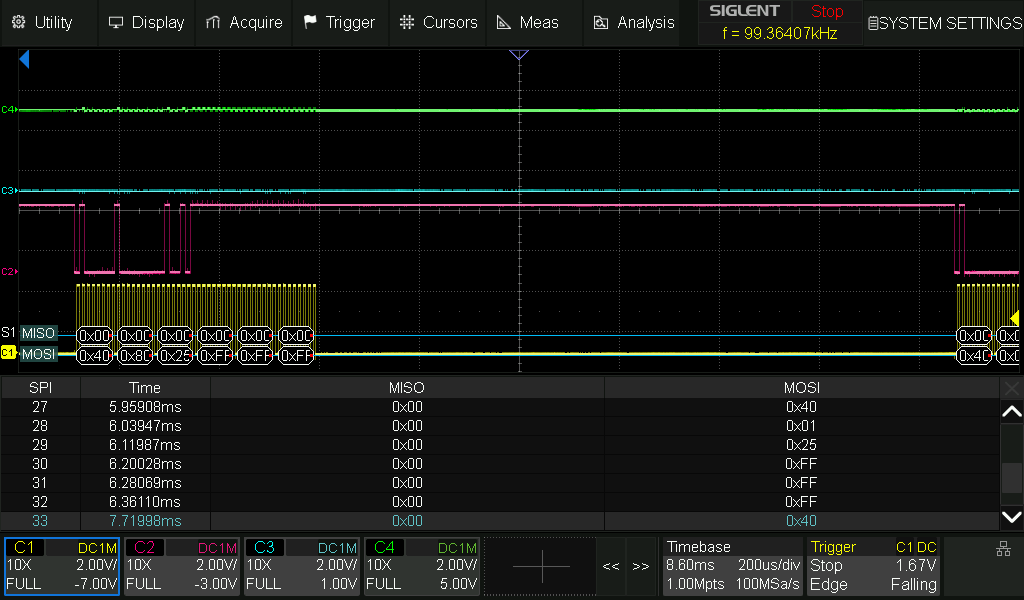
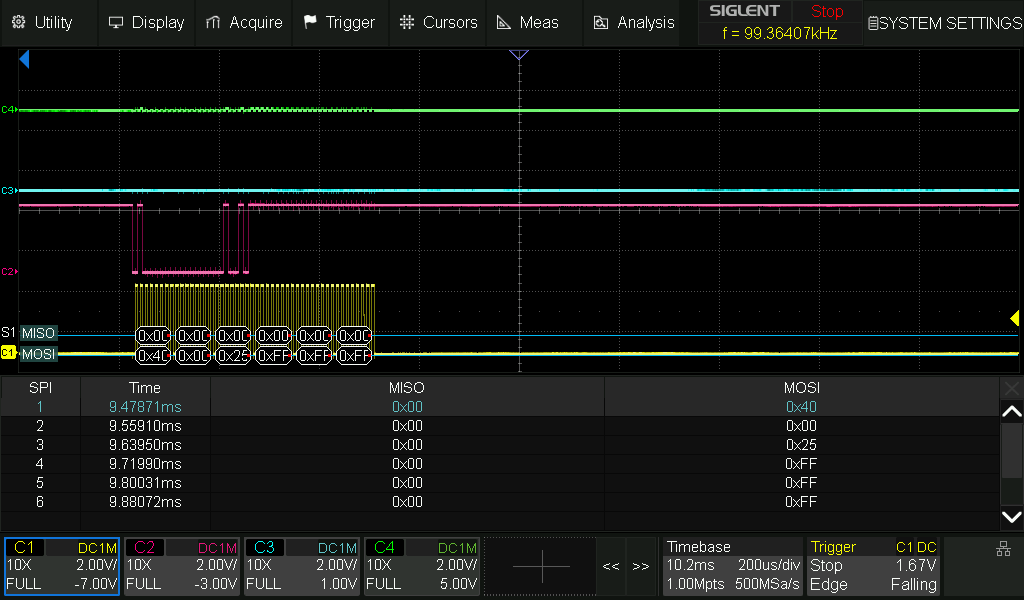
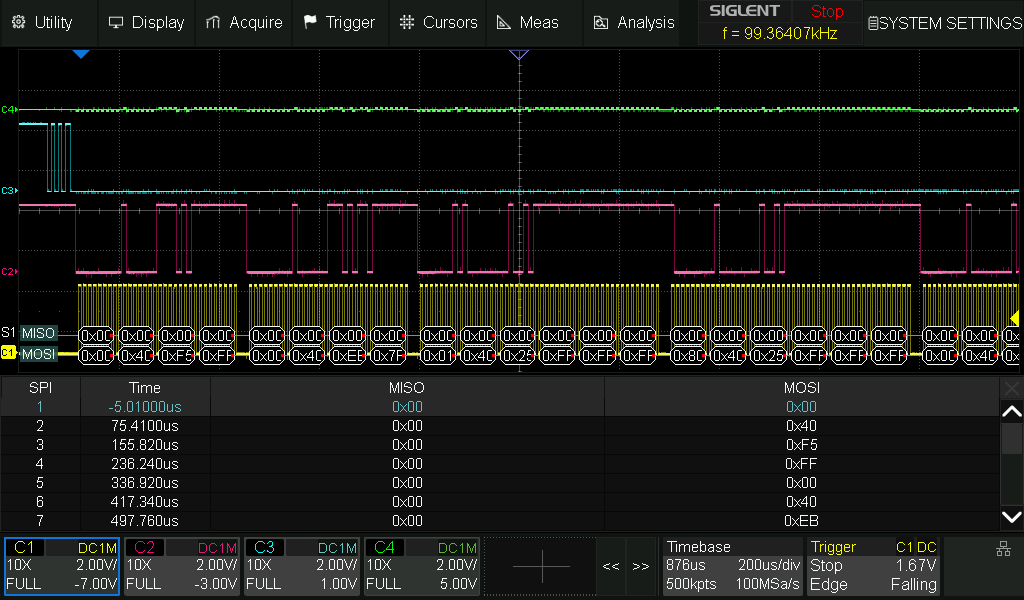
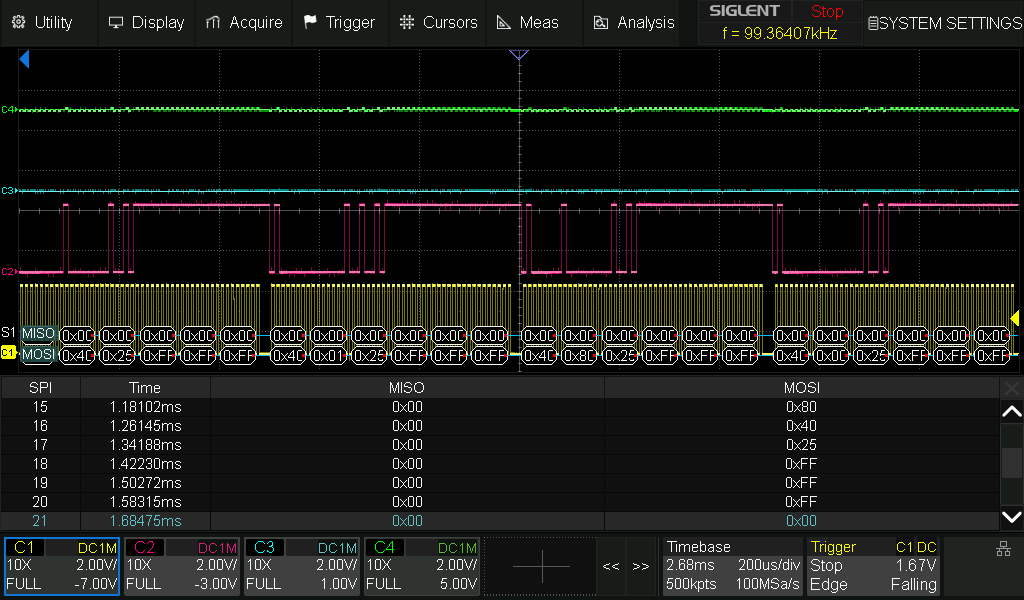
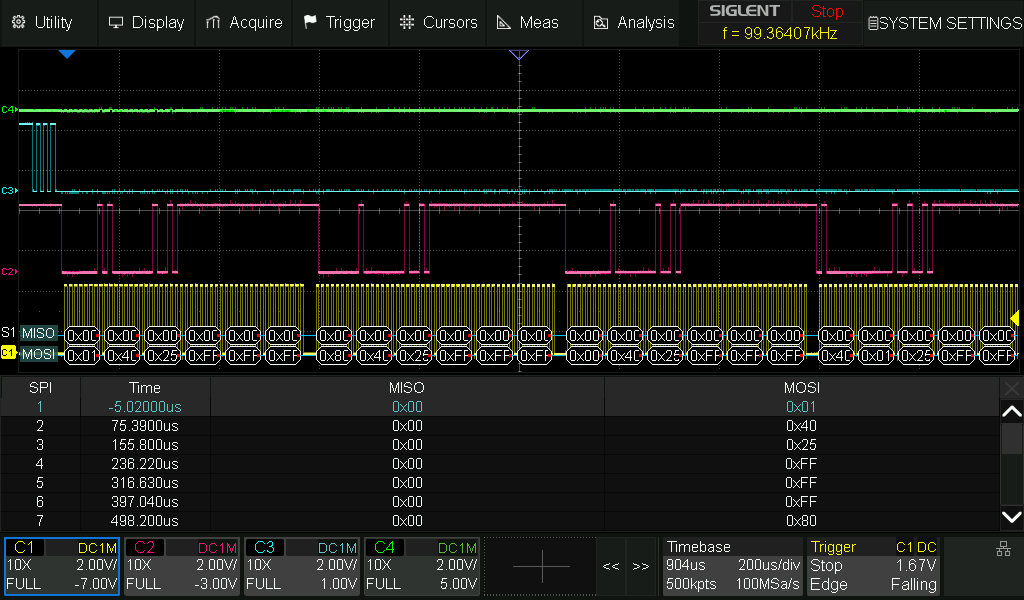
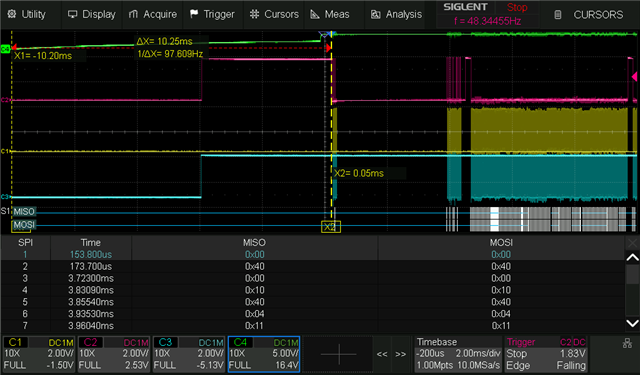
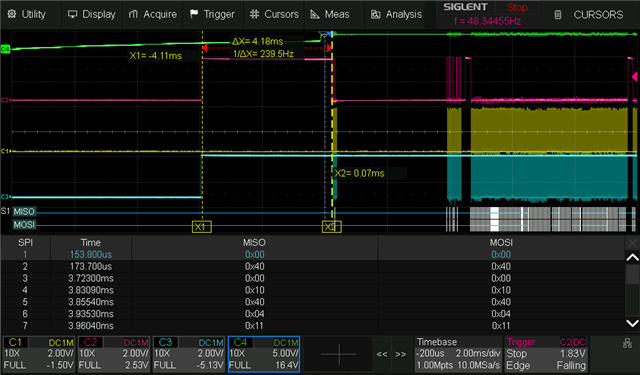
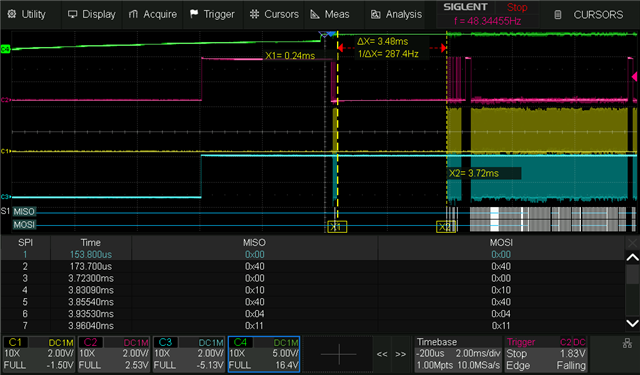
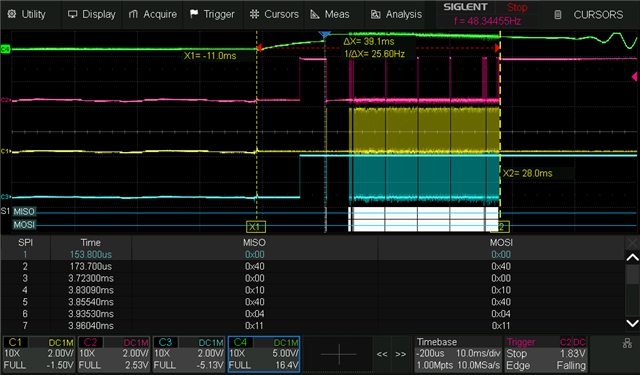
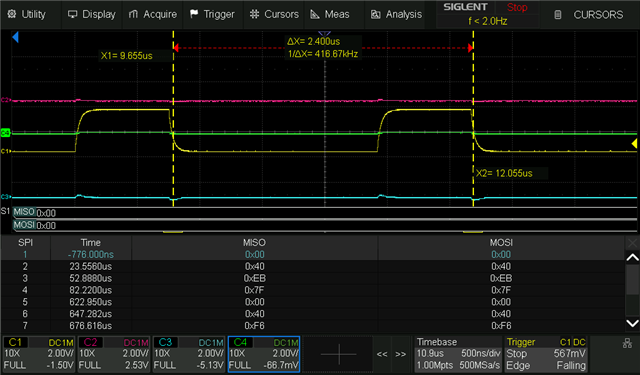
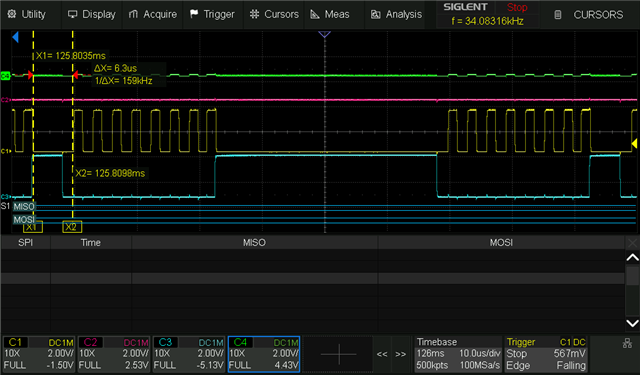
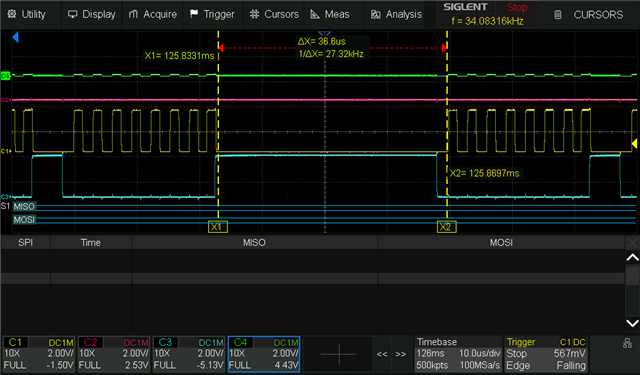
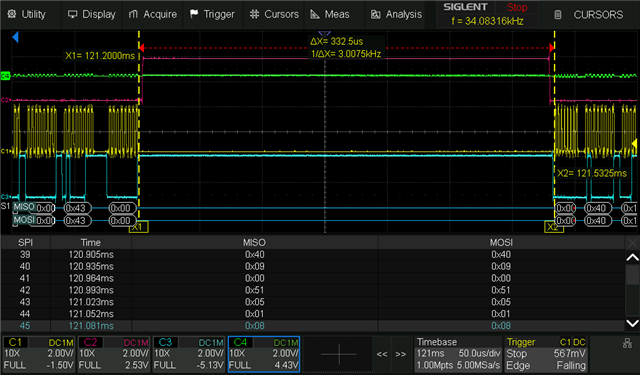
Failing to program it without understanding why it fails make me aim for a simpler middle step that is easyer to verify and iterate upon. As a proof of concept I’ve tried to read from the ADAU1761 to check whether the SPI syntax were correct but, also here, I’ve received no response no matter what I’ve tried. Notice that the green signal (MISO) never changes meaning that the ADAU1761 never responds.
↑1: do some of the recommended startup procedure before attempting a read with a slight delay between clocking the MOSI and MISO, still using my different interpretations of the GCWF↑
↑2: do some of the recommended startup procedure before attempting a read using my different interpretations of the GCWF (Generic Control Word Format)↑
↑3: do some of the recommended startup procedure and remove the wait between read requests, still using my different interpretations of the GCWF↑
↑4: Skip the recommended startup procedure and remove the wait between read requests, still using my different interpretations of the GCWF↑
Looking for clues:
Looking through the EZ forums I’ve been unsuccessful in finding any new leads as to what I might be doing wrong. The relevant posts I’ve found usually repeats the STARTUP section on page 43 of the data sheet as well as a supposed inability to read register values before uploading a program.
I have already verified integrity of the data lines from the MCU to the ADAU1761 and have made Oscilloscope measurements to see whether my MCU operates the SPI as expected. I’ve cross referenced it with the SPI section on page 39 of the data sheet as well as the whole control ports section in general. I’ve also verified the time constants with the timing chart on page 9/10 but I fail at discovering where I deviate.
Due to a general unceartainty regarding my implementation, I have tried various address syntaxes as I saw various possible interpretations of the Generic Control Word Format (GCWF) on page 39. None has worked so far.
Requesting help
I request help based off these oscilloscope measurements of my communication with the Adau1761. I need help trying to figure out what I am doing wrong. Maybe there’s a prerequisite I have overlooked or something I have misinterpreted.
I would naively expect a response as I keep clocking after sending the read bit and the address bytes. I’ve included all of my various possible interpretations of the Generic Control Word syntax.
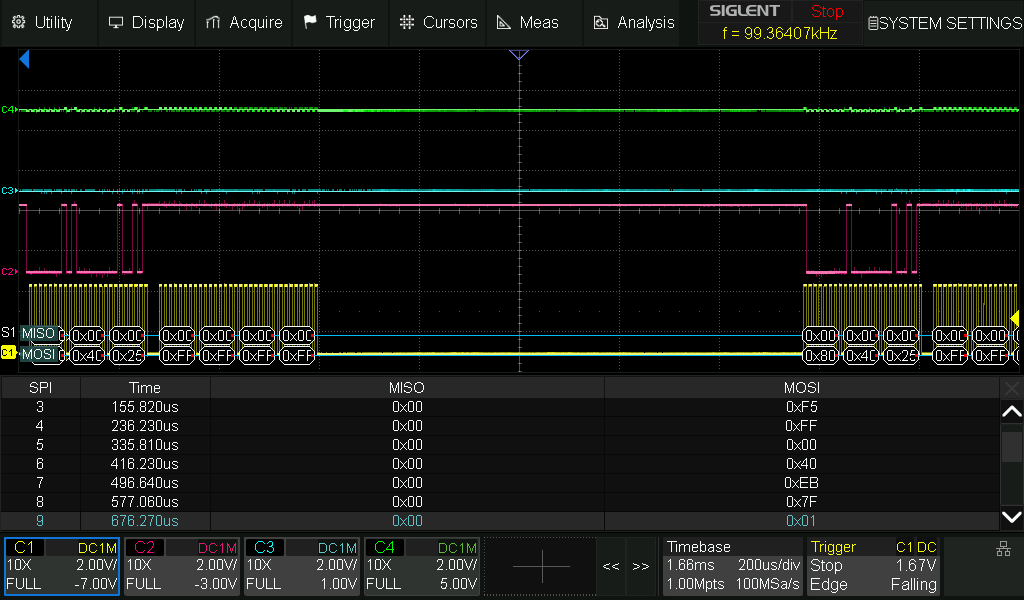
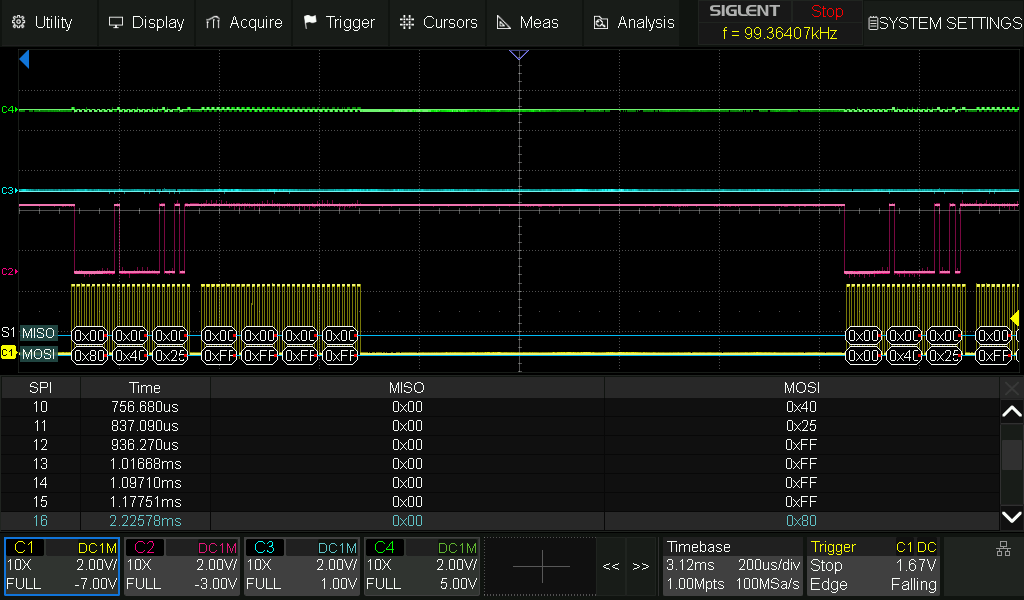
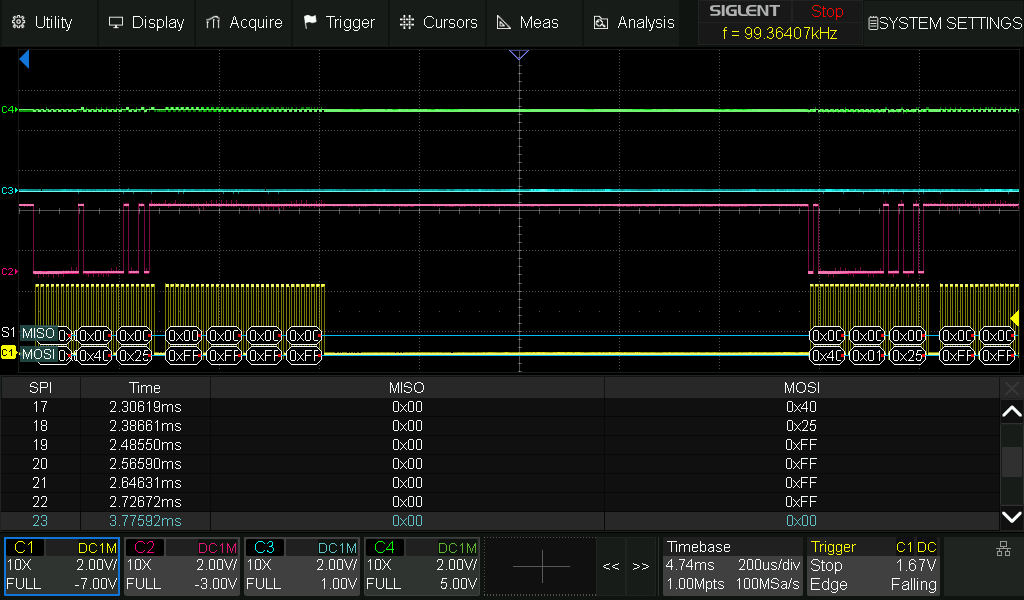
For the purpose of scrutiny, i have zoomed in on all of the different read attempts so you can see the scope interpreted SPI communication:
zoom on attempt 1
-recommended startup procedure before attempting a read with a slight delay between clocking the MOSI and MISO:
zoom on attempt 2
-recommended startup procedure before attempting a read using my different interpretations of the GCWF:
zoom on attempt 3
-recommended startup procedure and remove the wait between read requests, still using my different interpretations of the GCWF:
zoom on attempt 4
-Skip the recommended startup procedure and remove the wait between read requests, still using my different interpretations of the GCWF
It's the hardware department that have made, and tested the sigma studio code, on the devkit, and i am sure they use the newest versions if that is of importance.
Audio Signal Processors
Datasheet/Specs
programming
start code
oscilloscope
spi
startup
newbe
SigmaDSP Audio Processors
adau1761
Show More

Hello Clkvictim,
Thanks for providing a lot of info, it is helpful. I will carefully take a look at the pictures attached.
It seems you are trying to boot the DSP from your MCU via SPI.
Are you using the files that you exported from sigma studio to integrate with your MCU? if you are using those files, then it will take care of all the starting sequence (delay, PLL sequence etc.). if possible, please attach your code, we will have a look.
Do you have that sigma studio project that your team verified as working? if you have the project, we will try to debug from it.
we can narrow down the problem like, instead of booting the DSP from MCU, you can just use sigma studio to program the DSP and once the DSP is running fine, then we will try changing a gain parameter from your MCU (basically a single read or write to any parameter) and see if it works. if it works fine, then we can rule out the SPI communication problem.
I can see three toggles on the CS pin, so you put it in the SPI mode, that's good. I will have a look at all the pictures.
In the meanwhile, kindly attach your sigma studio project and your hardware schematics, maybe we can find something there.
Regards,
Harish
It's the Hardware guys who've verified the code with sigma studio and developer boards. I were initially trying to upload the binary from our MCU to the ADAU1761 over SPI. I could share the files and schematics but i am unsure as to what i am allowed to share on an open forum.
for now, lets stick to the - failing at reading from the ADAU1761 - issue and then i'll check what's ok to share on an open forum during the week.
Help Suggestion:
Could you, kindly, show me an oscilloscope screendump of how a successful SPI read is supposed to look?
maybe a picture of reading R31, playback line output left volumen control register 0x4025 over SPI.
would also appreciate oscilloscope screendumps of the initial SPI routine and first 10 bytes of uploading a program to the ADAU1761 over SPI.
i have cross referenced the waveforms in the datasheet but i must be misunderstanding something. pictures of a nonabstract real world implementation would be very useful, i think, and then i can scrutinize where i differ. a screendump wit a few words of what's being read/written.
Check during the week:
I'll check with the hardware guys during the week but a few screenshots of how it is supposed to work would likely get me there without needing too much of your time.
Hello Clkvictim,
I am joining with Harish to applaud your lovely post with lots of information!! I also love it that you pulled out a scope and took screenshots to "see" what is going on!! If you read a lot of posts on the forum you will see me asking for scope screenshots often and people so frequently run blind!
I do find it really strange that the MISO line never changes! This is a huge clue. There must be something simple we are all missing here.
I would step back and go for looking at the basic needs of the part for it to function. Please do not take anything I say here the wrong way. I would be doing this exact thing if this was my board and there is nobody who has ever done design work who can say they have never brought up a board and nothing worked!! Then to find out it was something simple. It always seems simple once you find it!
So here are my questions and they are geared towards answering "What does the part need to function?"
1) Power... Do you have AVDD and IOVDD as close to the pins as you can probe?
2) Internal Digital Power? Do you have the 1.5V DVDDOUT at the DVDDOUT pin, pin 24? This is the pin where you connect the bypass caps but if this voltage is not there then something is keeping the internal power up reset from happening.
3) MCLK, you must have a master clock for this part to function. There are a lot of details to setup the PLL properly and you could bypass the PLL and there are a lot of details to do that. For now, I would like to know if you are using the PLL and what frequency is the master clock you are sending to the DSP? did you check the waveform to be sure it is going high and low enough to meet the Vih and Vil specifications and the min high and low times?
4) Reset pin... I am laughing at myself for asking this question... One of the frustrating things about this part that I would have screamed about had I been on this design team is that it does NOT have reset pin!! So this means the timing of the AVDD is important. If the slope is too slow it might cause issues. I also do not like that the datasheet could have had more detail about all this. We have figure 29 and the text above it. This is something to look at. By the way, The suggestion that Harish gave is very very good which is to connect the DSP to SigmaStudio using the USBi and see if you can boot up and talk to the part on your hardware. This will help determine if it is some hardware issue that has nothing to do with your MCU code or if the hardware is fine and it is something in the MCU code. Harrish and I tag team a lot of posts. We are on opposite sides of the world so we got the time zones covered! LOL
If all of this looks good and nothing stands out then let's move over to simple communications.
I suggest you write to the serial port register and set it to be a clock master. Then grab the scope and see if you see clock output?
As I look for minimum registers to setup, I think these would be a good starting point.
R0 and R1 are to setup the PLL and also turn on the Core Enable. This is the internal clocking. If this is off it does nothing.
You should be able to read 0x4007 and see the PLL lock and enable bits.... But you have not seen anything when you try to read...
R15 and R16 are for the serial port.
R15 is the important one. The default settings of zeros are good except for bit 0 which should be a "1". This sets the serial port to be a clock master.
R16 does not matter because all we want to see is the clocks.
Register R60 matters. It sets the mode of the serial port pins between GPIO or for the serial port. That said, the default mode out of reset will be to have these pins as serial port pins. The value should be zero for this register. If your program is changing this then that might cause a problem with the serial port.
You might also want to read up on register R61 and R62. This is also detailed on page 45 of the datasheet for the startup section.
So if you can check this list of obvious things and then setup the part to simply output a clock from the serial port and see if anything is alive and you are actually able to write to registers even though you seem to not be able to read.
Looking forward to hearing back from you.
Dave T
So here are my questions and they are geared towards answering "What does the part need to function?"
1) Power... Do you have AVDD and IOVDD as close to the pins as you can probe?
Their power supply are now confirmed. We have differcult, but direct access to all pins on the ADAU1761 on the prototype board.
2) Internal Digital Power? Do you have the 1.5V DVDDOUT at the DVDDOUT pin, pin 24? This is the pin where you connect the bypass caps but if this voltage is not there then something is keeping the internal power up reset from happening.
Somehow, this was 3.3V instead of 1.5V. it’s now been corrected.
3) MCLK, you must have a m***** clock for this part to function. There are a lot of details to setup the PLL properly and you could bypass the PLL and there are a lot of details to do that. For now, I would like to know if you are using the PLL and what frequency is the m***** clock you are sending to the DSP? did you check the waveform to be sure it is going high and low enough to meet the Vih and Vil specifications and the min high and low times?
This was confirmed, and within spec.
4) Reset pin... I am laughing at myself for asking this question... One of the frustrating things about this part that I would have screamed about had I been on this design team is that it does NOT have reset pin!! So this means the timing of the AVDD is important. If the slope is too slow it might cause issues. I also do not like that the datasheet could have had more detail about all this. We have figure 29 and the text above it. This is something to look at.
The AVDD is assumed to be fast enough.
5) By the way, The suggestion that Harish gave is very very good which is to connect the DSP to SigmaStudio using the USBi and see if you can boot up and talk to the part on your hardware. This will help determine if it is some hardware issue that has nothing to do with your MCU code or if the hardware is fine and it is something in the MCU code. Harrish and I tag team a lot of posts. We are on opposite sides of the world so we got the time zones covered! LOL
This was suggested but we decided to test with the DVDDOUT at 1.5V before rigging the prototype to USBi.
After another failed read I moved on to implement what you wrote about the Registers.
6) I suggest you write to the serial port register and set it to be a clock m*****. Then grab the scope and see if you see clock output?
As I look for minimum registers to setup, I think these would be a good starting point.
R0 and R1 are to setup the PLL and also turn on the Core Enable. This is the internal clocking. If this is off it does nothing.
I didn’t have the core setup covered at all. R0 and R1 are not written to in my routine at all so I try to implement this using the setup meant for our prototype board: Integer PLL for fs=48kHz
Mclk 12.288 MHz
Input Divider 1
Integer 4
This translates to writing R0 and the last two bytes of R1 in the following way:
R0 { 0x00, 0x40, 0x00,
0b00001111} (0x0F)
R1 { 0x00, 0x40, 0x06,
0b00100000, 0b00000001} (0x2001)
For a test, I try to read the registers back after having written to them:
uint8_t read_Clock[4] = {0x01, 0x40, 0x00, 0xFF};
uint8_t read_PLL1[4] = {0x01, 0x40, 0x06, 0xFF};
uint8_t read_PLL2[4] = {0x01, 0x40, 0x07, 0xFF};
This results in the following:
...
I now see the short response during the read which mirrors my write; 0x0F
Or, at least I see it from R0, R1 doesn’t repeat what I’ve written:
I’d expect 0x20 and 0x01. Maybe I need to write the entire register before it accepts. Though, not seeing 0x10, but 0x00 when reading 0x4006 is unexpected as 0x10 should be the default value in absence of a successful write.
Anyways – as I finally see activity on MISO, I’m less troubled about the task at hand.
R15 and R16 are for the serial port.
R15 is the important one. The default settings of zeros are good except for bit 0 which should be a "1". This sets the serial port to be a clock m*****.
I tried writing to R15 and measure pin 28/29 GPIO 2 and 3 but there’s no clk on either. Might have misunderstood that though.
There’s always the possibility that the 3.3V on the internal have fried the chip. I’ve tried chips that could be “half fried” before, working as intended for some things and not others. There’s days before I can get a new prototype so I hope I can make this work in the meantime.
This is the progress for today – I’ll come with another update tomorrow as I work my way through the great advice received so far. If it fails, then I’ll talk to the hardware guys about hooking the prototype board up with USBi. I do wonder about the “sometimes” successful read though. This has all been done on an unprogrammed ADAU1761 as I wanted to verify my communications before attempting the programming part. But that is very much coming up.

Hello ClkVictim,
Let me start with the DVDDOUT pin. How was that 3.3V? This pin is an output from the internal voltage regulator. The purpose is to have some bypass caps on the regulator output. We cannot place large caps on the silicon die. Was the pin tied to a 3.3V power? Then I would be worried about damage to the part. But it does seem like it is a little bit "alive".
So moving on....
OK, some progress. The information about R0 and R1 is important. Yes, you MUST program these two registers. There is another little detail I think you missed. I will get to it. One step at a time.
You are toggling the CLATCH line three times. How long is it low each time? The datasheet is not super clear on the timing but from my quick look I think it needs to be low for at least 25ns. Are you meeting that? Often people just do three dummy writes then a proper write. You might want to try writing to R0 four times. The first three will be ignored but the CLATCH will certainly be low long enough!
Then you are sending an 0x0F to register R0....
This is a little strange but you are correct. With the PLL enabled the INFREQ will be 1024xfs.
You are setting the COREN to "1". This is super important. So you are good.
You say you are using a 12.288MHz clock. You are setting up the PLL for Integer mode R=4 and no input divider. This is good.
However, you are writing to register 0x4006 not 0x4002. Yes, 0x4006 is the location of the X and R settings and you do not need to stuff anything into M and N.
Let me look at what SigmaStudio does. First of all, it does write to all six bytes of R1. It also has an N and M in the project file which is most likely just a default that SigmaStudio does. In theory it should be ignored in integer mode.
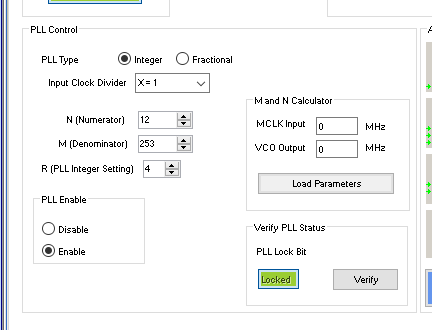
Here is a screenshot of SigmaStudio settings:
Input divider is 1 and R is 4 just like you are trying to setup.
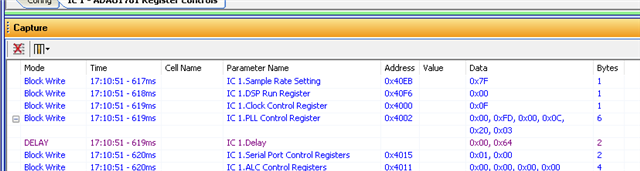
This is what SigmaStudio actually writes when I click Link/Compile/Download:
What is odd here is that SigmaStudio does not seem to be toggling the CLATCH three times! I had to change it to SPI because our eval boards are I2C. So this very well may be a bug I have not caught.
I have not looked on a scope to see if it is doing it and not reporting it on the capture screen. I know on other parts I do see it on the capture screen.
But, you see it is sending 0x0F to register 0x4000 like you are.
Then it is writing all six bytes. It is also writing an 0x03 on the last byte even though the bit 1 is read only. So I would have done the same thing as you, an 0x20 and 0x 01. But try sending an 0x03 for grins...
Then you see the rather long delay for the PLL to lock. 0x64 milliseconds. That is 100 ms. Are you waiting for the PLL to lock?
Then it goes on to write to other registers after waiting for the PLL to lock. Any writes to any other registers before the PLL is locked will not work!
Now, much later after you setup the registers and all the parameter RAM and load in the program and start the program running. There is a little thing to do that is sort of a bug work-around. You write to the Dejitter Register.
I suggest you get your hardware such that you can use SigmaStudio and program the part and get it working. Then you can capture the screen writes like I did and just copy it and you should be fine.
Dave T

Hey Dave - this is very helpful for a newb like me. I am very grateful!
But, we just got a critical assignment thought to take less than a week, meaning it will likely take a couple.
I'll come right back to this afterward and pick up where i left.
For now, as i have to work on this unrelated thing, this thread will be cold for a short while. I'll respond to this thread, having implemented the advice contained within, when i am done with the new assignment. It is entirely possible that i will have a non-fried prototype board, with easyer access to connect the USBi, to test on at that time.
Until then, keep it real
-ClkVictim
a quick question before i go - asked by a person who has yet to install and use sigma studio:
you're able to write SPI from sigma studio to the eval board, or do you have another board you have the ADAU1761 implemented on so you can write SPI to it?
What are you using to connect sigma studio to your ADAU1761 bord so that it programs over SPI?
I could request it for development use on the other side of the critical assignment. It would remove a lot of the guesswork to have the right tools.
Hello Clkvictim,
This Rev.B Eval board can't be programmed by SPI, the SPI pins are directly grounded without any resistors.
which makes this board to be programmed only by I2C, that too with a fixed address of 0x70 (R/W bit - 0). since the ADDR0 and ADDR1 are directly grounded, we can't change the I2C address.
ClkVictim said:
What are you using to connect sigma studio to your ADAU1761 bord so that it programs over SPI?
I'm not sure if Dave has any custom hardware that lets him program over SPI. Let's wait for him to reply.
ClkVictim said:
What are you using to connect sigma studio to your ADAU1761 bord so that it programs over SPI?
As Dave said, I can't see the toggling commands in the capture window while compiling the project over SPI. (though I can't program the board via SPI, I can still see the transaction in the capture window, we can also probe the USBi SPI signal and see the SPI transaction on a scope)
We usually see those toggling commands while programming sigma3xx DSPs over SPI. But I can't see in ADAU1761 project capture window. so, we will investigate this further.
Anyway, you can include that command in your code manually. I believe your MCU code does have those toggling commands.
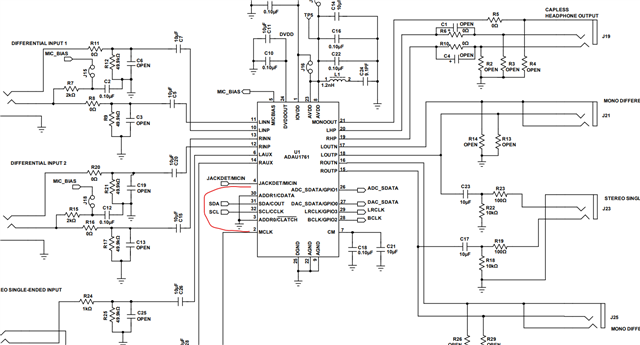
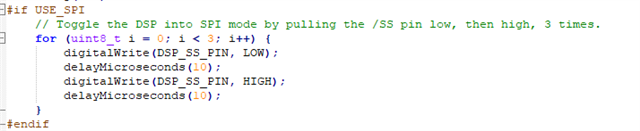
Below is a piece of code that we included in our uC interfacing example codes here
If you exported the system files from Sigma studio (where the toggling command is missing) and integrated that 'as is' (without toggling commands added), then it has to be the reason for the communication failure.
Regards,
Harish
yes, i'll wait to hear from Dave then. still having this on hold but it seems like i'm allmost done with the other assignment so i expect to be back on this within this week. The other, unrelated, assignment just needs a little documentation, cleanup and a few additional tests, so far all looks good.
Hey - I am done with the urgent assignment but it has resulted in prioreties shifting so that i'll be working on some other aspect of this project before returning to the Adau1761 again. Should i close this thread somehow and revive it if i need additional advice when i get back to this?
This project is growing quite big in scope resulting in some parts that needs to be proof of concepted before this.
I could also leave this thread unresolved until i return, or maybe just start a new thread when the time comes, referencing this thread.
Please tell me what's preferred - The advice has been very helpful and i am looking forward to implementing the remaining advice in this thread until i succeed, sharing what worked :).
I Figured out what the final piece was - very large delays. I did not leave enough time for the PLL to lock after writing the PLL control register. Experimentally i found that it needed 1.35ms but according to best practices, it should be set to 3.5ms to make the code reusable for all viable external clock sources. There's also a period after power on where the ADAU1761 has to "wake up" before it handles serial input - experimentally i found it to be around 10ms.
I discovered this by setting the USBi to program over SPI in SigmaStudio and making a prototype board where the USBI could connect to the Adau1761. This board did contain the "potentially fried, but somewhat alive" ADAU1761 that had recieved 3.3V on its DVDDOUT pin. In this setup i saw the incredible large delays, and variance, on everything when programming over SPI:
417 to 324 kHz clock (it is faster for the first 7 clock ticks in a register write)
6,3 to 32 us between every byte in a register write
400 to 700 us between every register write before PLL lock.
100ms wait for the PLL to stabelise.
When i set all timings to the slower end, in my firmware, and implemented the delays, it worked.
This assured me that there's no narrow set of timings that work and i found the limits of my own setup experimentally. i were very concearned about having to change clk mid byte write and implement byte delays as well at these very large delys in general - i have gotten the test program down to a init of only 39ms which is very acceptable over SPI.
In addition to this, i Didn't see the three pulls on the CS to change the ADAU1761 int SPI mode - meaning that the USBi cannot program my prototype board from Sigma Studio anyways. The chip is suspected to be stuck in I2C mode? - i might have missed these 3 CS squarewaves, though, and my chip might be fried but looked carefully and think that the USBi does not have the ability to program a proper connected, and powered, ADAU1761 over SPI.
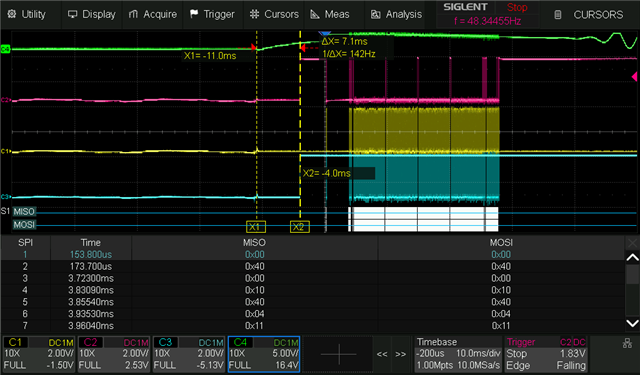
Thanks for the help - there were several things wrong but having oscilloscope pictures of verified working SPI communication helps immensely, so i will provide mine for the community:
understand that green is the signal proving that the part has been programmed with the test program and is successfully utilizing the external 12 228 kHz oscillator as main clock.
PIC Test Firmware time from power to MCU ready
PIC Test Firmware time from power to ADAU1761 comms
PIC Test Firmware time from MCU ready to ADAU1761 comms
PIC Test Firmware PLL setup time
PIC Test Firmware time from power to write end
USBI measurements - forgive my danish naming - google/chatgpt translate it if curious.
USBi afstand mellem Initielle og Blok write
USBi længde på Initielle register writes
USBi længde på blok write
USBi typiske Clk Frekvens
USBi korte Clk Frekvens i starten af nogle writes
USBi Normale pauser under program write
USBi Underlige pauser under program write
USBi Korteste Afstand imellem setup burst writes
USBi Længste Afstand imellem setup burst writes
USBi Afstand imellem initielle register writes
USBi Afstand imellem clockede bits
Please log in to reply.