Programming ADAU1761 using Sigma Studio Capture Window Address + Data sent from microprocessor Circuitpython via I2C
I am (usualkly) successfully able to use address and data copied from the capture window of Sigma Studio to program an ADAU1761 via I2C. I use CircuitPython running on an nRF52840-based microprocessor to read and process these data files, The code performs registry writes, burst writes, delays and registry burst-reads based on the sequential instructions in the captured address/data information.
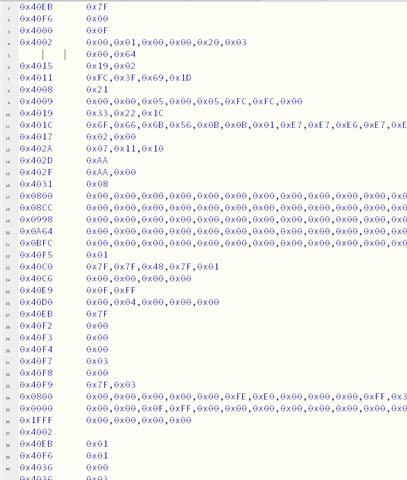
In most instances, this seems to work perfectly. I design a schematic in Sigma Studio, test it via the USBi i2C interface my circuit to assure it works, and then download the data onto my nRF52840 CircuitPython device. There, the device reads the data line by line and sends it via writes, curst writes... to the ADAU1761. This is, in essence, what the "Default Download" script created by "Exporting System Files" in SS does. I show a sample of such data for a tone generator shown below.
What I am trying to undestand is, why in many cases this works perfectly while in some it does not. For example, is there some peculiarity in the way Sigma Studio sends I2C data compared with how it is done using CircuitPython. As further information, I place small pauses between writes and have set the CircuitPython I2C as:
i2c = busio.I2C(board.SCL, board.SDA, frequency=100000)
I realize this may be (or maybe not) a CircuitPython issue but it does cross the product line so I would appreciate any help or advice to solve this problem here.
Audio Signal Processors
software
sigma studio 4.7
Sigma Studio 4.7; CircuitPython 9.2.8
I2C Programming
SigmaDSP Audio Processors
adau1761
circuitpython
Show More
Hello JWG417,
I would like to know what is the MCLK input frequency to the part?
Because the issue is that about 1 out of 4 times starting up the part with a 24.576MHz MCLK, the PLL did not lock and had no output. sometimes it will work fine, so it's kind of flaky.
Other than that, it seems like you have taken care of everything.
JWG417 said:
For example, is there some peculiarity in the way Sigma Studio sends I2C data compared with how it is done using CircuitPython
Since you export files from sigma studio, the needed delay between PLL lock and other places in the booting sequence are also exported in the files as a code. when your uP sends the same sequence with proper delay functions, then it's just as same as what sigma studio does to program the DSP. So, it will be fine. However, make sure that the delay amount/sample parameter given in uP is enough, maybe increase the delay time to a few ms and check if works fine.
Also, you will have to add pull up resistors on the I2C line, try 2.2Kohm. Since you didn't attach the schematic, I'm not sure.
And what's the I2C clock frequency, Is it 400KHz or more than that?
JWG417 said:
i2c = busio.I2C(board.SCL, board.SDA, frequency=100000)
I can see in this command that the frequency is 1MHz, is that so?
Try reducing the I2C frequency to 400KHz or below and then see if it works properly.
Kindly let us know how it goes.
Regards,
Harish
Please log in to reply.