Fractional Delay Buffer Splitting Problem
When I create a project and use two fractional delay blocks that sample the same signal, the compiler shows that buffer space is reserved only once—which seems logical.
I want to use 48 fractional delay blocks that sample from a single signal, but each block I add reduces the number of delay samples to choose from. I need 1440 delay samples.
If there's only one 1440-sample buffer, I don't understand why SigmaStudio limits the use of multiple output channels to using data from a single shared buffer.
Audio Signal Processors
dsp
software
sigmaStudio 4.7
fractional
sigmastudio
delaybuffer
SigmaDSP Audio Processors
delay
adau1466
Show More
Hello Sebastian,
I am not understanding what you want to do? You mention wanting to use 48 fractional delay blocks yet do not know why each one needs its own memory? Because it is a separate block.
Can you draw a block diagram of what you want to do with the audio and delays?
Do all 48 blocks need to be 1440 long?
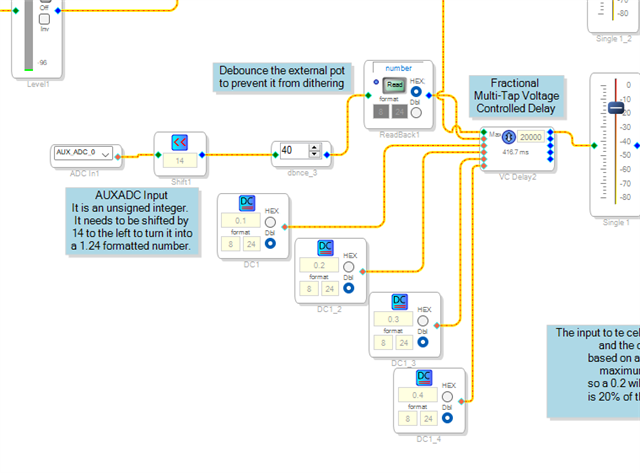
Here is a program I had put together to show how to use an AUXADC to control the delay time. I just now added four more outputs to make it nine outputs and added DC blocks for delay time control and it did not add to the number of samples reserved for the block in the compiled program.
I could add a LOT more outputs.
Dave T
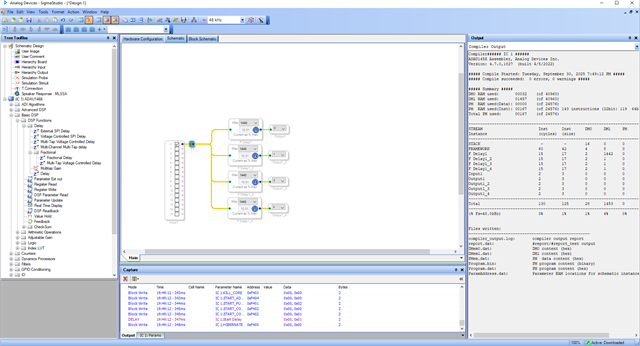
The idea is to connect like this. Each block has the same signal source, so it uses a single buffer in memory,
thus saving memory consumption.
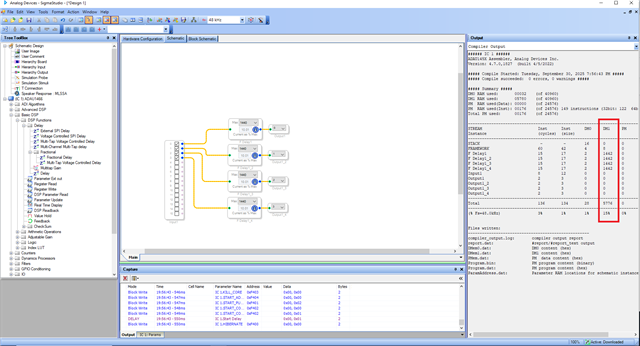
The next photo shows each connected to a different signal, and shows the increased memory footprint.
I wonder why I can't use 48 fractional delay blocks, each with 1440 samples,
since all the blocks use the same signal source and therefore operate on a single delay buffer.
Hello,
How will they be used? Will the delay be exactly the same? I do not expect that because you would just "Y" the signal.
How do you want to adjust the delay time? Only during development or during run time?
Dave T
My application has an external MCU that overrides the values. Each delay will be slightly different, but within a fixed range of 1440 samples.
OK, Then use the multitap delay like I did in my example and use DC cells like I did. Your MCU only needs to write to the DC cell for each output.
The value coming in is easy to workout. A 1.0 in 8.24 format gives you the full delay time. So a value of 0.1 is ten percent of the full value.
Here is my quick example file you saw in the schreenshot.
Dave T
ADAU1452 AUXADC Controlled Fractional Multitap delay-and DC cell control.dspproj
Thank you Dave! That really helped.
Sebastian Ł
Please log in to reply.