View SECONDARY_I2C traffic in Capture Window?
In another thread, I saw a Capture Window log with IC 1.SECONDARY_I2C Block writes logged. I'm currently seeing I2C transactions on the secondary bus using a Beagle I2C analyzer, but I'm wondering how to view the block writes in SigmaStudio 4.7
I assume that the USBi interface cannot write directly to the secondary I2C bus because it is not directly connected. Thus, I assume that the Sequence window cannot download I2C Writes to that bus. Does SigmaStudio download code to the SigmaDSP to drive write transfers on I2C?
Related question: Were the IC 1.SECONDARY_I2C Block Writes from that other Q&A thread part of a simulation? ... or were those writes going out over a real hardware bus?
Audio Signal Processors
software
4.7
AK5574
AD2437
AK4458
adau1463
SigmaDSP Audio Processors
Show More
Hello SoundConsulting,
Yes, your understanding is correct There is no connection between the USBi and the secondary I2C port. Sigma-Studio downloads the program to the Sigma-DSP, and the Sigma-DSP communicates with the slave device by writing data to it.
The SECONDARY_I2C is a register in the Sigma-DSP This register allows the master control port to be configured such that the I²C signals appear on different pins than the SPI signals. This feature enables an application to support both master port protocols without requiring external switching hardwares. However, only one protocol can be used at a time. The master port must be reconfigured in software before switching to a protocol different from the one selected during boot.
Regards
Aravindh
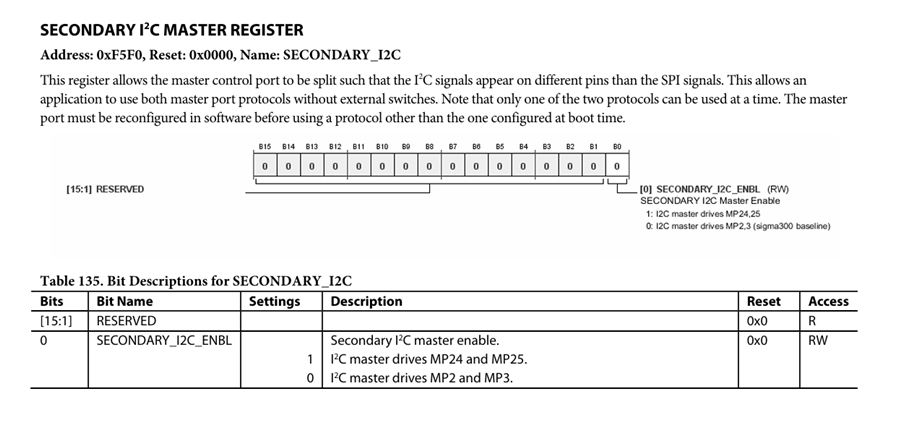
Thank you for explaining. I saw a Block write in a log here, and assumed it was the I2C data itself. Now I understand that was a single-byte write to the SECONDARY_I2C Register, not the data on the I2C bus itself.
Please log in to reply.