Change processor with redoing everything
How do I change the processor type from e.g. ADAU1452 to ADAU1451 without changing the register settings and the layout.
Please answer fast because close to release day...
Thanks.
Audio Signal Processors
adau1452
adau1451
sigmastudio
SigmaDSP Audio Processors
Hi John,
As long as you are changing between an ADAU1452 and an ADAU1451 (or ADAU1450), you will not need to change your layout or register settings, as they are common across the ADAU145X series. However, there are some differences in data memory, S/PDIF availability, core frequency, and ASRC configurations that you should be aware of:
Regards,
Tyler


Thanks for quick answer.
Yes, the reason for changing is that the production will run on 1451, however all development is done on the 1452. I want to be sure that all limitations wrt RAM is covered by the Sigma tool.
My question is very practical. In SigmaStudio how do I change the processor with in the same project. Please advice.
Thanks
John
Hello John,
This is actually a little difficult to do but you can do it. This is the way I do it.
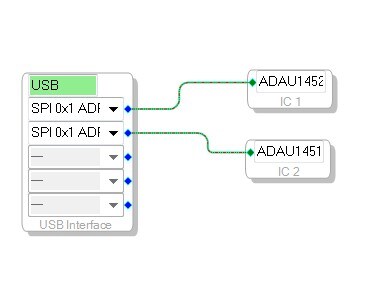
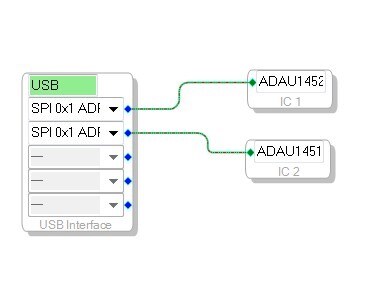
Add the other processor into the hardware configuration so that there are now two ICs. (may be three if you have the EEPROM.
Then you go through each cell, select them and right click on the cell. You will see an option for "Change IC". When you select it you will not see what IC you are currently on but the choices of what you can select. So in my case I could see IC-2 as a selection. If you see IC-1 then you have already changed it to IC-2.
So do this for every cell. The Input cells are the problem. you will not be able to change those. For the input cells you will need to remember the connections and delete them. Then insert the input cells for IC-2 from the Toolbox. Then rerun the wires. You will note that they are now blue instead of yellow.
The output cells you are able to change to the new IC.
Once all the cells are moved you will be able to delete IC1. If there is anything still assigned to IC1 then it will not let you delete it.
Give this a try and see how it goes. I would save a copy as a safety before you start. I have only done this on small projects not large ones.
Dave T
Hi
thanks for the suggestion, it's quicker than my way of doing it which was to drag a new version of the cell onto the schematic from the other processors toolbox, change the connections to it and then delete the old cell. finally, after doing all the cells, delete the old chip from the config window.
I didn't know you could flip a cell from one IC to another even if the other IC was a different type.
PhilipJ
Hello Philip,
Well, you cannot do it all the time. In this case both ICs have pretty much the same library so it will most likely work. Then you also have to make sure that all the connections are correct when you try to compile. If you drop in a cell from one IC and another from the another IC SigmaStudio will not let you connect them. But switching the IC once it is connected you go around this checking function so you can have a connection that is impossible to have where the audio from one IC is routed to another in the project. The compiler will catch that but it is best to prevent it before you try to compile.
Let me know how it all went. Like I said earlier I have not done it with a large complex project so there may be some pitfalls I am not aware of.
Dave T
Please log in to reply.