ADAU1446 ASRC
Dear ADi Experts
I'm struggling with my project based on ADAU1446. Unfortunately I don't have any development board, only my target device...
Project is much more complicated than showed in examples on wiki or tutorials and I have difficulties in configuring everything.
Quick overview on hardware connections:
- input 0 is slave, input, 16 bits per sample, 192kHz, I2S format;
- input 1 is master, input, 24 bits per sample, 48kHz, I2S format;
- input 2 is master, input, 24 bits per sample, 192kHz, I2S format;
- input 3 is master, input, 24 bits per sample, 192kHz, I2S format;
- input 4 is master, input, 24 bits per sample, 96kHz, I2S format;
- input 5 is master, input or output selectable by configuration during operation, 16 bits per sample, 96kHz, I2S format;
- input 6 is master, output, 24 bits per sample, 192kHz, TDM4 format;
- input 7 is master, output, 24 bits per sample, 192 kHz, I2S format;
Also S/PDIF input and output are in use.
The place where I'm stuck is very beginning, I mean making ADAU1446 to generate clock signals on appropriate pins. I am almost sure I am doing something wrong and there is the problem...
Please have a look at attached sample.dspproj file, I created a simple one demonstrating the Idea of a problem I'm facing, without any signal processing, just signal crossing.
I know I am asking a lot, maybe too much, but could you, please have a look and guide me step by step how to set all registers in ADAU1446? Right now it is not configured not to make any confusion...
Thank you very much in advance
Best regards
Damian
Audio Signal Processors
adau1446
sigmastudio
SigmaDSP Audio Processors
asrc
Hi zabson,
Thanks for the question.
The ADAU1446 does not have any ASRCs. Based on your number of inputs and neccessary ASRCs I would suggest looking into the ADAU1442. Getting an evaluation board would likely help you with development.
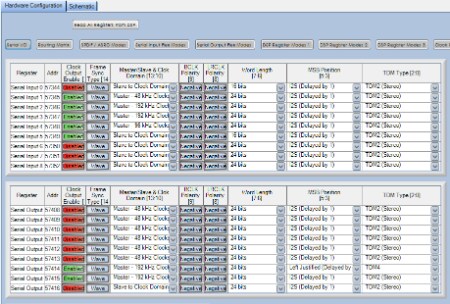
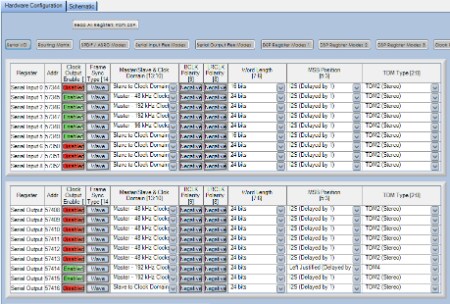
I opened up your project and took a look at the register settings. When setting up your clock domains you need to go to the 'Serial I/O' page of the Hardware Configuration and Register Control tab in SigmaStudio. Here, you can change the parameters of each clock domain such as Sample Frequency, Master/Slave, Word Length, I2S or TDM, and TDM type.
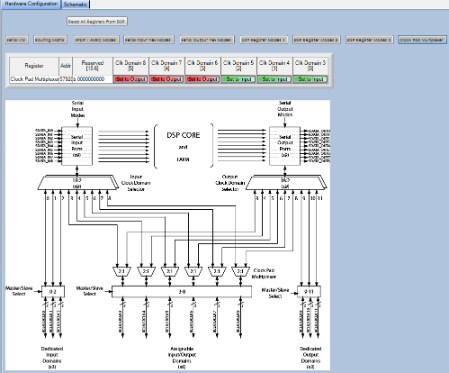
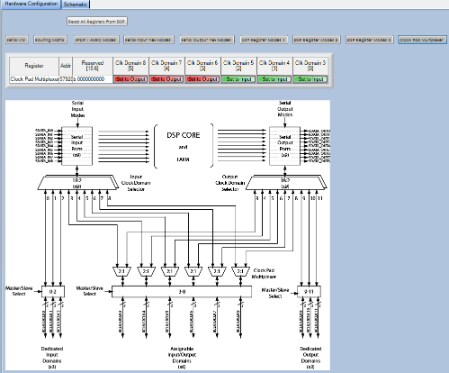
ASRCs 3 - 8 are assignable to either inputs or outputs. In the 'Clock Pad Multiplexer' page these parameters can be set for each domain. In your example you should have ASRCs 3-5 set as Input and ASRCs 6-7 set as output.
I re-attached your project with a few settings changed so that the clocks are setup in accordance with the system you explained above. You should be able to see the BCLKs and LRCLKs on the appropriate pins when this project is downloaded to the part.
Let me know if you need anymore assistance.
Regards,
BillJ
Hi BillJ,
Thank you for your answer
Infortunately it turned out that I have difficulties in communicating with ADAU1446. I thought I was writing some registers etc but when I tried to read them back, I got 0xFF, so nothing was set. I am using SPI bus to communicate with ADAU1446, here is my procedure, correct me if I'm wrong, please:
1. Power on;
2. Reset of ADAU1446;
3. Wait until PLL is set (in my case 20ms as it is minimum 16.6ms with my configuration);
4. Pull /CS low three times;
5. Regular SPI communication.
Do I miss anything? Do I have to wait between step 4 and 5? If so, for how long?
Regards
Damian
Hi,
I just wanted to bring my problem back to the top page as it is still not solved
I checked everything and ADAU1446 still doesn't generate any clock signal (I assume that code from SigmaStudio is correct). Is there any method to verify that CPU's core is running? When I try to read back what I've written to the memory, I receive nothing bit 0xFF so something's wrong. How can I start to trace what?
Thanks in advance for any respond and any idea
Damian
Hi Damian,
Sorry that your question remained unanswered. Based on your description, I think you are doing everything correctly. There is no wait time required between toggling the CS line 3 times and then resuming normal SPI communication.
If you are unable to read back the memory, then I think I would agree that something is not working properly. Have you tried starting with a very simple example project (just the default SigmaStudio register settings will be fine, with one input connected to one output)? It might be a good starting point to try to download and run a simple program and verify that it is working before trying to download and run a more complicated project.
There are some simple example projects here that might help you get started: https://wiki.analog.com/resources/tools-software/sigmastudio/tutorials#adau144x-compatible_example_projects
Hi BrettG,
Thank you for your reply. This is what I'm going to do but I thinh I should go even "deeper" and check if the hardware is OK. To do that, I ordered one sample of ADAU1446 (and I hope my order will be accepted), solder it to some adapter PCB with all necessary caps, oscilator, PLL circuit etc. Then I will be able to check it with some proto board with simple microcontroller.
Right now, on my target board I don't need any complicated algorythm, I simply need to have appropriate clock rates on I2S outputs. Without them I cannot test other ICs on my board (i.e. FM radio receiver).
I will keep you informed
Hello again,
I'm writing again because I cannot get any progress running ADAU1446 - still no communication with IC. Is there any method to verify that PLL is locked and CPU works correctly or lack of communication means that it has to be damaged?
I am analyzing inputs and outputs with simple Saleae analyzer, in attachment I'm sending a dump of what I can see, maybe somebody will be able to find something I'm missing or I'm doing wrong.
[To open attachment you can use free software from http://www.saleae.com/downloads ]
Any help very welcome!
Hello,
Looking at the thread so far, I think it's important to start from the beginning. We do not know if your hardware is set up correctly, if the core and I/O pins are powered correctly, if there is a valid MCLK and if the PLL is locked; the ADAU1446 will not respond to programming if it is not powered properly.
I would recommend that you purchase an evaluation board: the EVAL-ADAU1442EBZ is guaranteed to work and will give you confidence in troubleshooting that the problem is in your hardware or in your code or in your data format.
Best regards,
Coleman
Hi ColemanR
Thanks for your reply. I will try to provide you with as much information as I can.
In attachment please find a pdf file with schematic of ADAU1446 connection. I based it on evaluation board and sample schematics in IC's datasheet. Please have a look on it, including pinout as I created this element by myself.
Supply voltage on appropriate pins was the first thing I checked, even before I noticed lack of communication. Is there any way to say if PLL is locked if there is no communication with core and I cannot set CLKOUT (it is disabled by default unfortunately)?
I would really love to buy eval board but I'm sorry to say that I cannot afford it and there is no place I could borrow it from...
Best regards
Damian
This question has been assumed as answered either offline via email or with a multi-part answer. This question has now been closed out. If you have an inquiry related to this topic please post a new question in the applicable product forum.
Thank you,
EZ Admin
Please log in to reply.