Why are there two outputs on SigmaStudio's Hilbert transform widget?
I would expect only one output, being the Hilbert transform, I see two. Which is the transform and what does the other do?
Audio Signal Processors
hilbert
sigmastudio
SigmaDSP Audio Processors
adau1761
transform
Show More
Hi bootload,
I apologize for the late response - I have been out of the office frequently over the past several weeks.
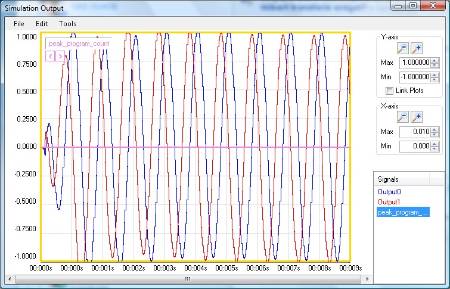
I am not very familiar with this algorithm, but the algorithm designer told me that there are two outputs of the transform. One is delayed in phase by 90 degrees from the other. So, we refer to the non-delayed output as the "cosine" and the delayed output as the "sine."
In that definition, the top output is the delayed "sine" output, and the bottom output is the non-delayed "cosine" output.
Here is an example of a 1 kHz sine tone input to the Hilbert Transform. The blue output is the top output pin, and the red output is the bottom output pin.
The way I look at it is the following
you have a signal y = a cos wt -- and you are really just interested in the amplitude of the signal
so generate abs( hilbert(y) - will give you a constant a -- i.e. the envelope
How does it work?
hilbert gives you back -- y + j quad(y) - which in this case is a cos wt + j a sin wt
so abs (hilbert (y) ) = a for all t
Another way of explaining it on the web was
Take DFT (FFT) of signal -- turn all sin components into cos and all cos components into sin (make amplitude at f = 0 to be zero -- then take inverse DFT -- that will giive back an imaginary quad signal
-- add back in the original signal -- and thats the hilbert transform
I think you do this by FFT(y) negate all negative frequencies -- zero f = 0 the inverse FFT and then add back in y
Brett,
Where do you find that 'Simulation Output' graph that you show above. When I use the 'probe' function my x-axis is frequency, not time. If I use the 'graph' function it get a very slow sampling rate.
Bob
Hi Bob,
The simulator is an unreleased feature of SigmaStudio. Hopefully we will be able to work out its bugs and provide it to users soon.
Hi Brett,
The simulator window is a welcome new feature that I'm looking forward to, so hopefully the s/w group can swat those bugs!
Bob
Please log in to reply.