Xfade
ADAU1446
Sample rate 192kHz
When fed directly a DC 0 or 1 it will do as expected. Now +1 works differently than +2 but that is (I think) a different question entirely. Anyhow, with any Slew rate (I usually used low values like 1-5) and with a square wave of 1 Hz going into it I get the same output at all times, no fading. I tried doing an ABin CDout boolean to route a DC into but that doesn't work either.
Questions:
1) How do I feed a crossfade with a square or sine wave.
2) What are the unit increments of the slew value? I see that 1 is near instant, 10 is a few milliseconds and 23 is a looong time. What is the formula?
With this image I get 1khz at all times. It doesn't matter if I change the boolean case (and recompile) or even change the lower two DC values.
Audio Signal Processors
boolean
crossfade
fade
adau1446
xfade
sigmastudio
SigmaDSP Audio Processors
cross
compare
dc
Show More
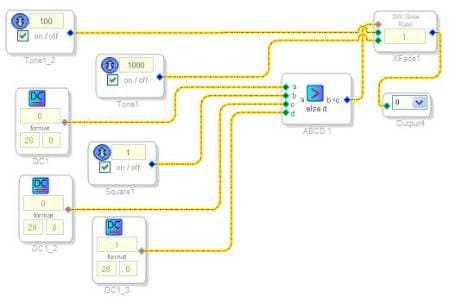
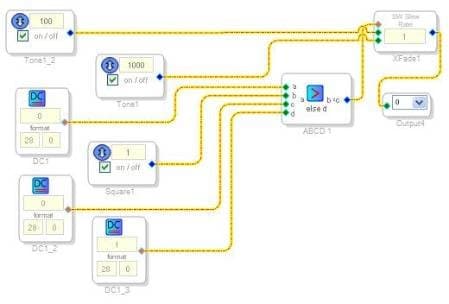
It looks like the control input for the XFade block should be in 5.23, not 28.0, format. If you change the c and d inputs to the conditional block to 5.23 format, you should hear the signal fading between the two input tones. I did this test with dc generator blocks on all of the inputs to the conditional, without the square wave input.
In the future, it's very helpful if you can attach your actual SigmaStudio project file to your post here. That allows us to quickly and easily test exactly what you're using in your setup.
Thanks for the tips. I'll make to sure include a project from now on.
I have found that by far the most troubleshooting I've had to do with SigmaStudio has been related to modules mixing int with float. It is not alwasy clear which module expects which data type and the help info (which is usually absolutely amazing) doesn't mention it consistently. Plus, to change between the two formats to make the control/audio signals useful is cumbersome via multiply /w DC.
For future versions of SigmaStudio, it would be helpful to either make it more obvious what format is expected or to implement a scheme that allows for easy conversions, maybe built some modules? I know it's just an interpretation of data, but it would be a time saver on a designer's side of things.
Thanks for the feedback. We realize that the help documentation doesn't always have all of the information (such as the expected number format) and we're working to update older documentation pages to include this. In the meantime, if there's something that you can't find in the help, we're always happy to help you out here.
This question has been assumed as answered either offline via email or with a multi-part answer. This question has now been closed out. If you have an inquiry related to this topic please post a new question in the applicable product forum.
Thank you,
EZ Admin
wiki.analog.com/.../crossfadedatacontrolled says that the Crossfade (Data-Controlled) uses 28.0 format integer input, but I've been using it with 5.23 format floats to fade between inputs and it seems to work that way, and I made a corresponding edit to the wiki over a decade ago that was never accepted:
wiki.analog.com/.../crossfadedatacontrolled
Which is correct? Is my edit and usage incorrect, but happens to work anyway somehow?
Please log in to reply.