MCLK to ADAU1761 cannot be locked in Sigmastudio
Hi All
I am developing a project for ADAU1761 . A active OSC =24.576MHz clock connect to MCLK pin. Now LINK and COMPILER , verify PLL status always keeps unlocking. checked the 24.576MHz clock by scope, the MCLK path just from clock generator to MCLK pin. used 12.288MHz clock , can be locked .
1761 DATASHEET donoes not say the input MCLK charecteriistic detail .
Meican.
Audio Signal Processors
clock
SigmaDSP Audio Processors
adau1761
pll
Hello Meican,
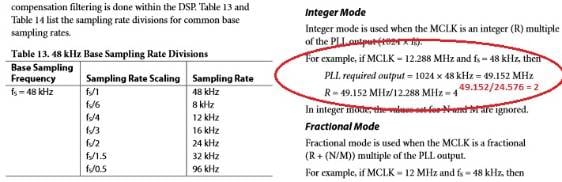
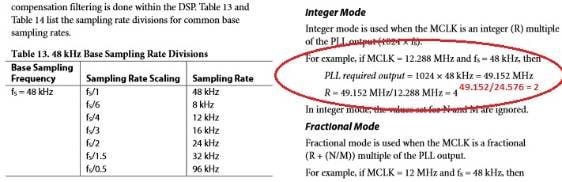
With a MCLK input of 24.576 MHz, the ADAU1761's PLL only needs to multiply by 2 (instead of 4) to produce the needed 49.152 MHz MIPS clock. The multiplier is called "R" in the -1761 data sheet, page 27:
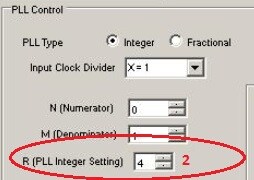
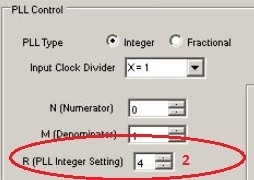
This corresponds to setting R = 2 in your SigmaStudio HW Config >> Codec Setup page:
With a setting of R = 4, the PLL is trying to multiply the 24.576 MHz MCLK to 98.304 MHz, which would overclock the -1761 -- that's why its PLL won't lock. Try setting R = 2 and see if that helps.
Best regards,
Bob
Thanks Bob.
Exactly like you said .
Now resoved this issue.
Meican.
Please log in to reply.